NexAIX-官方博客
In the open-source LLM ecosystem of the second half of 2026, Zhipu (Z.ai)'s GLM-5.3 family has triggered a phenomenal engineering migration. The mysterious model that previously dominated various aggregation leaderboards under the anonymous codename stealth/ox-alpha has been revealed—as the first native multimodal model in the GLM-5 series, GLM-5.3-Flash (320B total parameters, 18B activated parameters MoE architecture, employing hybrid linear and sparse attention mechanisms) quickly became the preferred foundation for building visual Agents, GUI automation, and front-end UI restoration, thanks to its 1M context window and extremely low inference cost; meanwhile, the flagship model GLM-5.3 (753B total parameters, 40B activated parameters) significantly strengthened long-range software engineering (open-source SOTA such as Terminal Bench 3.0) and cybersecurity vulnerability analysis capabilities (leading on the CyberGym benchmark) during post-training; and even in vertical domains, a derivative GLM-5.3-FlashX-Legal for contract review and cross-document validation has been further developed.
If your team has previously followed basic model selection and plan rules, you can refer to our earlier GLM API Access and Selection Guide: From GLM-5.2/5.3 Million-Token Context, Coding Plan Rate-Limit Pitfalls to Self-Owned Compute Calls. However, the current hot demand has entered deep waters: How can the native multimodal perception capability of GLM-5.3-Flash and the deep architectural reasoning capability of GLM-5.3 be seamlessly orchestrated into the same production-grade Agent workflow?
This article skips basic concepts and directly from the perspective of production code and infrastructure, dissects the modality division when calling the GLM API, parameter migration pitfalls, third-party compute degradation issues, and provides high-reliability production implementation practices.
I. The "Dual-Core" Division of the GLM-5.3 Family: Don't Let the Wrong Model Handle the Wrong Modality
In earlier model iterations, developers were accustomed to thinking of the "Flash version" as merely a low-cost stripped-down version of the flagship. But in the GLM-5.3 series, this perception leads to serious architectural design mistakes. According to official technical documentation and weight architecture, these two models play distinctly different roles in production pipelines:
| Dimension | GLM-5.3 (Flagship Deep Reasoning) | GLM-5.3-Flash (Native Multimodal Cost-Effective) |
|---|---|---|
| Model Architecture | 753B total parameters / 40B activated MoE | 320B total parameters / 18B activated MoE (hybrid linear + sparse attention) |
| Input Modality | Pure text only | Native multimodal (text, images, video frame sequences, etc.) |
| Context and Max Output | 1M context / 128K max output | 1M context / supports long-sequence structured output |
| Core Engineering Positioning | Complex system refactoring, multi-step CLI tool calling, security auditing and vulnerability reasoning | UI screenshot to code, chart/document visual parsing, high-frequency subtask execution, video stream understanding |
| Open-Source License | MIT License | MIT License |
In actual development, many teams migrating from legacy vision models or pure-text models to GLM-5.3 directly send requests with image payloads to glm-5.3, causing API errors; or conversely, use glm-5.3-flash to handle extremely complex cross-module backend architecture refactoring. The correct approach is to build a two-tier routing architecture of "multimodal perception + deep planning".
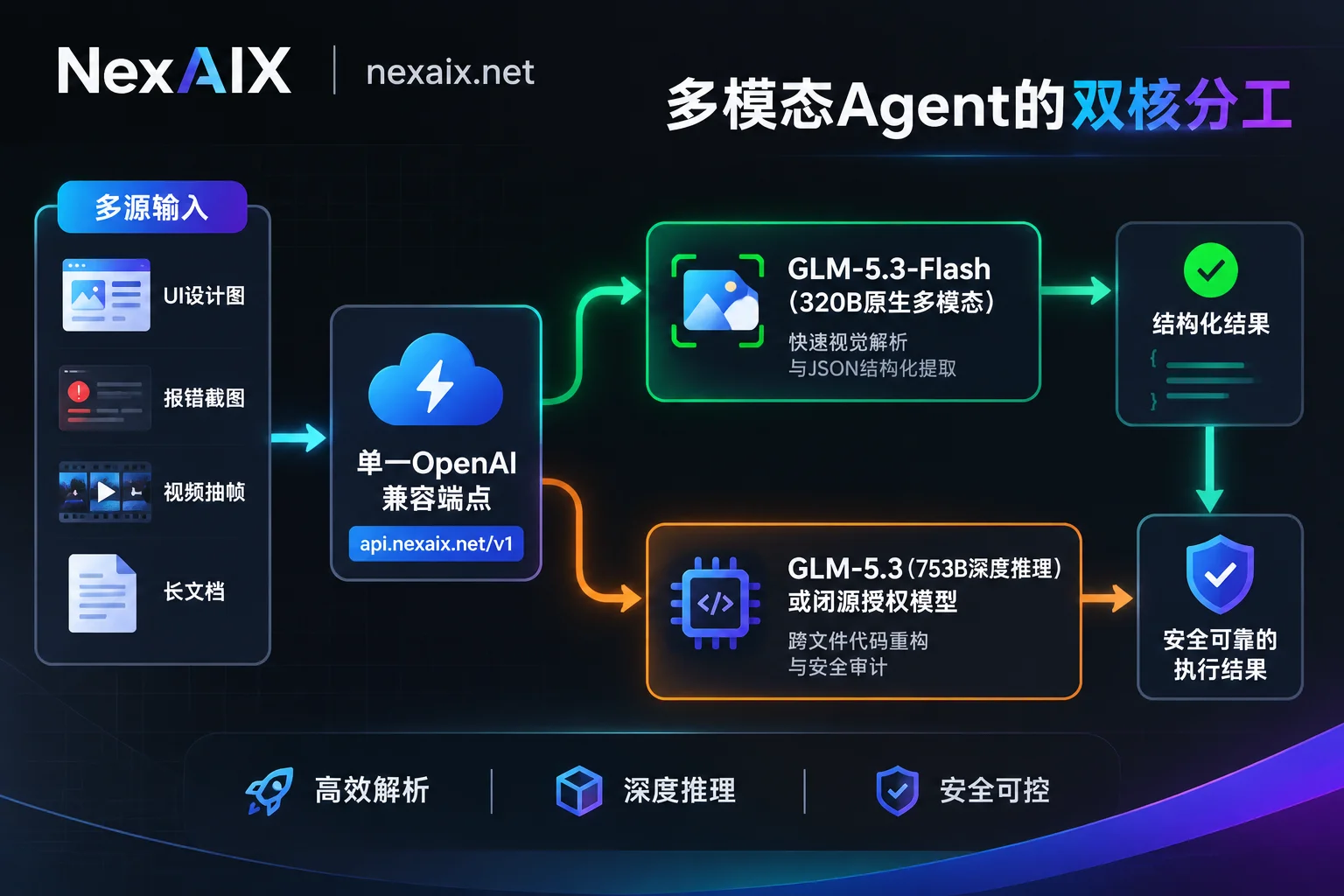
As shown in the figure above, in a typical full-stack development or automated operations Agent:
- Perception and high-frequency execution layer (GLM-5.3-Flash): Responsible for receiving front-end error screenshots, Figma design drafts, or monitoring video frame sequences, combined with
toolsdefinitions to quickly extract structured DOM trees or anomaly indicators. - Core planning and refactoring layer (GLM-5.3 / closed-source flagship): Receives the pure-text context and codebase index distilled by the perception layer, initiates deep thinking to perform cross-file architecture modifications and security boundary validation.
II. Three Major Engineering Pitfalls When Connecting to GLM API in Production
When you decide to push the above architecture into production, directly connecting to scattered upstream channels or cheap aggregation platforms often leads to the following three thorny technical pain points:
1. Forced Thinking Mechanism and Migration Parameter Errors (400 Bad Request)
When upgrading from GLM-4.x or early GLM-5 versions to glm-5.3 and glm-5.3-flash, the most common online failure is parameter validation failure. In GLM-5.3, deep thinking capability (Thinking) is designed to be always on and no longer supports manual disabling.
If your legacy code retains the thinking: {"type": "disabled"} configuration, the request will directly fail after switching the model ID. For lightweight tasks, the correct approach is to keep the thinking mode on and explicitly lower the reasoning intensity parameter reasoning_effort to low (for complex coding tasks, use high or max). In addition, during multi-turn function calling, ensure that the interface layer does not tamper with or discard the model's native thinking and tool call fields.
2. Third-Party Resellers' "Precision Shrinkage" and Implicit Routing Substitution
Since both GLM-5.3 and GLM-5.3-Flash have open-sourced weights under the MIT license, there are now over 30 providers hosting these two models on overseas and domestic aggregation platforms. However, 753B and 320B MoE models have extremely high requirements for memory bandwidth and multi-machine interconnect.
Some low-cost API channels, in order to reduce per-GPU costs, engage in the following backstage operations:
- Aggressive quantization degradation: Privately compress the officially recommended high-precision weights into low-bit quantized versions, causing the model to frequently produce syntax corruption during million-token retrieval (NIAH) and complex JSON Schema output (for the underlying logic of precision differences, see What is the difference between BF16 and FP8 model inference precision: memory, speed, quality, and selection).
- Implicit model downgrade: During peak load or capacity saturation, silently forward traffic originally requesting
glm-5.3toglm-5.3-flashor even earlier lightweight models at one-tenth the cost, causing long-range Agent tasks to inexplicably "lose intelligence" midway.
3. Personal Subscription Plans (Coding Plan) and Multi-Client Protocol Fragmentation
Many developers initially experience GLM-5.3 through personal subscription plans in tools like Cline, Claude Code, or OpenCode. But as we pointed out in our previous discussion on rate-limit troubleshooting and architecture governance, personal plans are subject to a 5-hour dynamic refresh pool, weekly quotas, and peak-hour point doubling deduction rules, and have many limitations in protocol support, making them fundamentally unable to carry high-concurrency, stateless API calls of enterprise production systems.
At the same time, cloud vendors have various naming conventions for model IDs (e.g., z-ai/glm-5.3, zai-org/GLM-5.3-Flash, etc.), and switching between multiple platforms requires not only maintaining multiple Base URLs and bills but also repeatedly modifying hardcoded identifiers in code.
III. Why Production Teams Choose NexAIX for GLM API Calls
In response to the above pain points, NexAIX (nexaix.net) provides developers and enterprise technical teams with a transparent, pure production-grade AI API infrastructure. When integrating the GLM series and building multi-model Agents, you directly gain the following deterministic guarantees:
1. Self-Owned Compute Cluster Deployment, Fully Transparent Inference Precision and Specifications
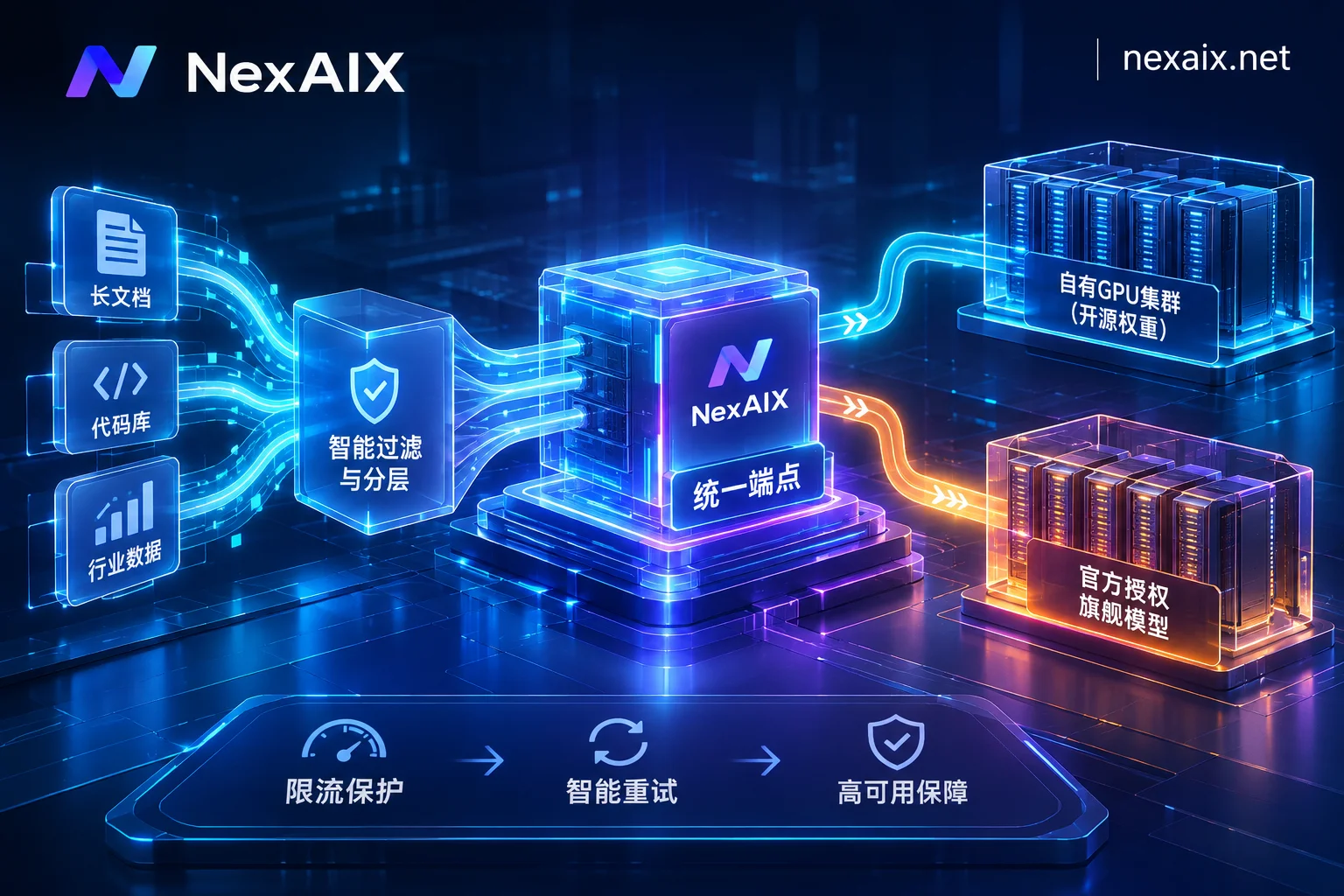
In NexAIX's model list, open-source weight models including GLM, DeepSeek, Kimi, MiniMax, Qwen, and gpt-oss all adopt a "self-owned compute deployment" model: we deploy the officially released open-source weights directly on our own GPU clusters in self-built and leased data centers, fully operated and maintained by our own engineering team, never reselling any third-party second-hand quotas.
On each individual model detail page (note: when accessing a single model page, replace dots in the model ID with hyphens, e.g., glm-5.2 corresponds to the detail page https://nexaix.net/models/glm-5-2/, while the model field in the API request body still uses the standard ID), we clearly indicate the model's supply method, context length, maximum output, inference precision (BF16, FP8, MXFP4, etc., truthfully labeled per model), input modalities, and open-source license. If a specific open-source weight variant you need (e.g., a domain-specific fine-tuned version) is not yet listed, you can directly send the model name and expected usage to [email protected], and we will reply with the launch schedule after evaluating compute capacity.
2. "No Degradation" Commitment, Parameters Passed Through As-Is, and Four-Dimensional Self-Verification
Production Agents fear the underlying foundation becoming a "Schrödinger's black box" the most (see Don't Let "Black Box" APIs Slow Down Agent Development: Building an Auditable, Non-Degraded Production-Grade Agent Foundation). NexAIX strictly implements the no-degradation commitment:
- The
modelfield in the response strictly corresponds to the model actually performing inference; - No switching to smaller models, no precision reduction, no truncation of context or maximum output, no injection of any hidden system prompts;
- Core control parameters such as
temperature,top_p, andmax_tokensare passed through as-is. - You can independently verify at any time through four methods: retesting with fixed prompts and random seeds, checking the returned
modelfield, stress testing near the upper length limit, and asking the model to repeat all received messages.
3. Single OpenAI-Compatible Endpoint, Seamless Collaboration Between Open-Source and Closed-Source Models
NexAIX implements the API strictly according to the OpenAI Chat Completions specification (see one-line integration instructions), fully supporting streaming output (Streaming), function/tool calling (Function Calling), and multi-turn conversations.
More importantly, one API Key grants access to all activated models on the platform. Whether it's open-source models like GLM, Kimi, and DeepSeek running on our own compute cluster, or closed-source models like Claude, GPT-5.6, Grok, and Gemini accessed through vendors' official commercial licensing channels (with formal contracts, invoices, auditable, never using account pools or reverse-engineered client protocols), the interface format is completely identical. To switch models in your code, you only need to change the string in the model field.
IV. Practical Code: Implementing a "Visual Parsing + Deep Refactoring" Workflow with a Single Endpoint
Below we demonstrate through a standard Python code example how to use the official openai SDK to connect to NexAIX, first using the multimodal-capable GLM model to parse architecture/UI images (video scenarios are also supported by passing extracted frame sequences as image sequences), then seamlessly handing the results to the deep reasoning model to generate a remediation plan.
Simply point base_url to https://api.nexaix.net/v1 and replace with the API Key obtained from the console (for specific model IDs and supported modalities, refer to the real-time annotations on the official model marketplace):
import os
from openai import OpenAI

# 1. 初始化客户端:仅需修改 base_url 和 api_key
client = OpenAI(
    api_key=os.getenv("NEXAIX_API_KEY"),
    base_url="https://api.nexaix.net/v1"
)

def multimodal_agent_workflow(image_base64: str, repo_context: str):
    # 阶段一:调用多模态模型(如 glm-5.3-flash)解析前端报错截图或架构图
    print("[Step 1] 正在通过多模态模型解析视觉输入...")
    vision_response = client.chat.completions.create(
        model="glm-5.3-flash",  # 实际可用模型ID请以 https://nexaix.net/models/ 为准
        messages=[
            {
                "role": "user",
                "content": [
                    {
                        "type": "text",
                        "text": "请仔细分析这张前端控制台报错与UI偏移截图,提取出具体的报错堆栈信息和样式冲突的组件名称,以精简的Markdown列表输出。"
                    },
                    {
                        "type": "image_url",
                        "image_url": {
                            "url": f"data:image/png;base64,{image_base64}"
                        }
                    }
                ]
            }
        ],
        temperature=0.2,
        max_tokens=2048
    )

    visual_diagnosis = vision_response.choices[0].message.content
    # 每次调用均返回唯一请求 ID,便于生产排障
    print(f"视觉解析完成 (Request ID: {vision_response.id})")

    # 阶段二:仅修改 model 字段,无缝切入深度推理模型(如 glm-5.3)进行代码重构
    print("[Step 2] 正在通过旗舰推理模型生成跨文件修复补丁...")
    coding_response = client.chat.completions.create(
        model="glm-5.3",  # 无需更换 client 或端点,只改 model 字符串
        messages=[
            {
                "role": "system",
                "content": "你是一名资深全栈架构师。请根据视觉诊断结果与仓库代码上下文,输出可直接应用的 Git Diff 补丁。"
            },
            {
                "role": "user",
                "content": f"### 视觉诊断结果:\n{visual_diagnosis}\n\n### 相关仓库代码:\n{repo_context}"
            }
        ],
        temperature=0.1,
        max_tokens=8192,
        stream=True  # 生产环境长输出建议开启流式响应
    )

    print("\n--- 修复方案输出 ---")
    for chunk in coding_response:
        if chunk.choices and chunk.choices[0].delta.content:
            print(chunk.choices[0].delta.content, end="", flush=True)
If your team uses LangChain, LlamaIndex, Vercel AI SDK for orchestration internally, or configures in client tools like Dify, Cherry Studio, NextChat, Cline, OneAPI, you can also get started immediately by filling in the above base_url and Key (for configuration details, refer to How to change custom base_url in LangChain and How to add an OpenAI-compatible channel in One API).
V. Enterprise-Grade Production Privacy, Rate Limiting, and Billing Governance
When incorporating the GLM API into core enterprise R&D pipelines or customer-facing business systems, technical leaders often care more about security and high-availability governance than the model's performance itself. NexAIX has made comprehensive engineering designs at the underlying architecture for this:
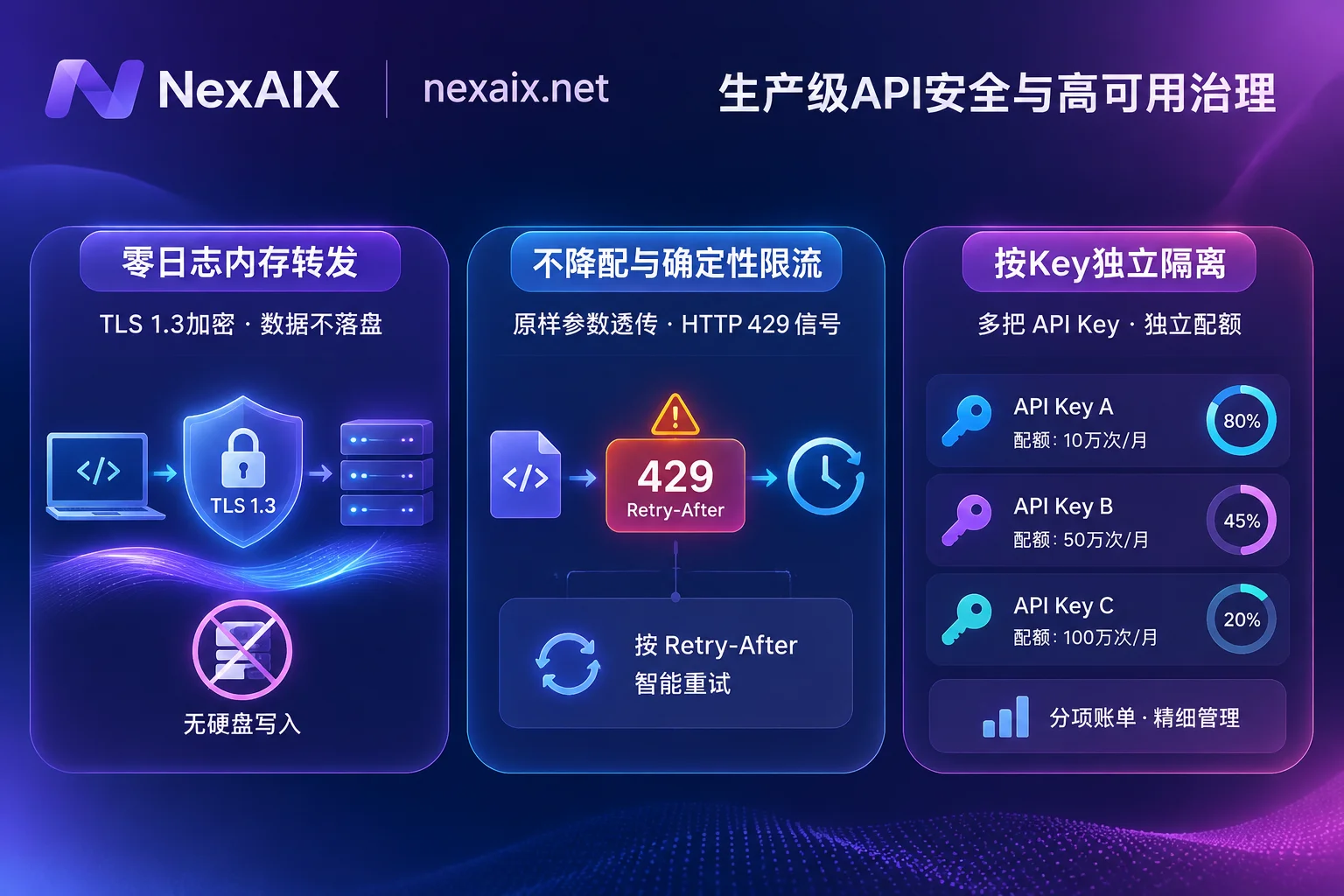
1. Zero-Log In-Memory Forwarding, No Data Retention Risks
Code repositories and business screenshots often contain core trade secrets. On the NexAIX platform side, we strictly implement a no-conversation-logging policy:
- Your
promptandcompletionare forwarded only in memory and released immediately after the request ends, never written to disk; - The platform only retains metadata for billing reconciliation and troubleshooting (request ID, model name, token count, timestamp, status code);
- User data is never used for training, nor handed over to any third party for training; TLS 1.3 encrypted transmission is used throughout from client to inference node.
- Note: For open-source models like GLM running on NexAIX's own compute cluster, the data lifecycle ends entirely within our zero-log in-memory loop; if you also call closed-source models, data retention after the request reaches the upstream vendor is handled according to each vendor's official terms (currently the official website notes that Claude Opus 5 supports zero data retention, and Fable 5 notes 30-day retention).
2. Deterministic 429 Rate-Limiting Contract, No "Dead Waiting" or Silent Substitution
Under million-token stress testing or sudden traffic spikes (note: first-token latency and cost for very long inputs naturally increase with input length), the most fatal issue is not an error, but the upstream interface hanging indefinitely and dragging down the entire call chain's thread pool. Under NexAIX's high-throughput and rate-limiting mechanism:
- Each Key has clear RPM, TPM, and concurrency limits (if business growth requires higher quotas, contact us anytime to evaluate an increase based on actual cluster capacity);
- When compute is saturated, the interface immediately returns a standard HTTP 429 status code with a
Retry-Afterresponse header, never hangs the connection indefinitely, and never arbitrarily swaps the request to a cheaper model. - Because NexAIX adheres to deterministic delivery with a single provider and single endpoint, without black-box automatic routing, you can independently decide at the business code layer based on the clear 429 signal whether to retry with exponential backoff, enter a message queue, or explicitly degrade and switch to a backup model.
3. Per-Key Isolation and Compliant Business Support
In multi-team or multi-Agent collaboration scenarios, NexAIX supports creating multiple API Keys: each Key has independent quotas, independent permissions, and independent usage bills itemized by model. If a Key used for front-end testing is accidentally leaked, it can be revoked separately without affecting the production mainline; for any online anomaly, simply contact technical support with the Request ID returned by each call for quick localization.
At the business compliance level, NexAIX has a formal corporate entity and supports signing formal contracts, issuing VAT invoices, and executing SLA service agreements and Data Processing Agreements (DPA). For finance and government teams with strict physical isolation or intranet compliance requirements, you can also directly email [email protected] to discuss dedicated resource pools or private deployment solutions.
Conclusion: Start Your Production-Grade GLM API Experience Now
Whether you use GLM-5.3-Flash to build multimodal intelligent agents for image-to-code and GUI automation, or leverage GLM-5.3 to tackle million-token-level long-range software engineering refactoring, a stable, transparent, non-degraded compute foundation is the watershed determining whether an Agent can move beyond a demo and truly generate business value in production.
Now, you don't need cumbersome enterprise qualifications—simply use your email to visit the NexAIX Console (api.nexaix.net) for free registration, and get free testing credits upon registration. Spend three minutes to obtain an API Key and replace one line of base_url, and experience the authentic cutting-edge large model capabilities on our own GPU compute cluster.