 NexAIX-官方博客
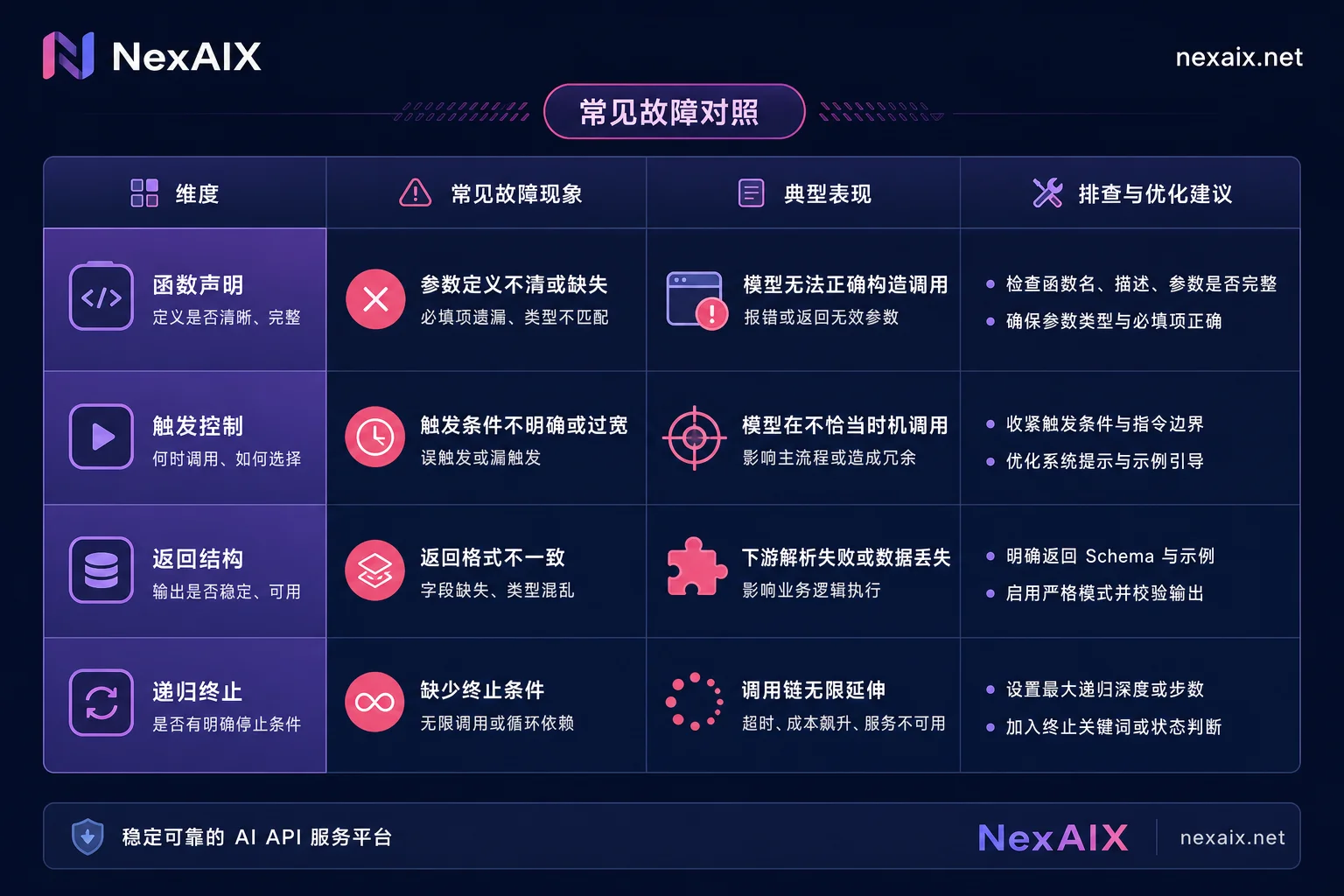
The tool calling API loop skeleton has only four parts: declare tools → send request → execute tool_calls and return results using tool_call_id → check if there are more tool_calls to decide whether to continue. The differences concentrate on four layers: function declarations, trigger control, return structure, and recursive termination.
| Difference Layer | Common Failure Symptoms |
|---|---|
| Function declarations | Missing fields, Schema rejected or parse errors after model switch |
| Trigger control | Model doesn't return tool_calls, gives text directly |
| Return structure | tool_call_id mismatched or missing in parallel calls |
| Recursive termination | Infinite loop or mid-loop interruption in multi-step loops |
The specifications in this article are based on the official documentation status available as of August 2026.
Clarifying Concepts First: Are Function Calling and Tool Calling the Same Thing?
Many developers get confused by terms like “function calling,” “tool calling,” and “MCP tool.” Simply put, OpenAI’s early functions field and the current tools / tool_calls are the same thing in different generations of writing; while tool in the MCP spec is the same JSON Schema expressed in another protocol (JSON-RPC).
So you can directly map name, description, inputSchema from MCP to the OpenAI format tools definition. The mental model is: declaration formats are mappable, calling protocols differ. Don’t debug them mixed together, or you’ll waste a lot of time.
Difference 1: Function Declarations—How to Write JSON Schema That Works Across Multiple Models
In the tool calling API, each function consists of three parts: name, description, and parameter JSON Schema. This is similar to MCP’s name / description / inputSchema structure.
Engineering recommendations:
- Explicitly write
required: Missing it may cause missing parameters. - Avoid deep nesting and overly long enums: Some models have difficulty parsing them.
- In
description, describe when to call: Not just “what it does,” but also “under what conditions.”
Note that the specific supported range depends on each vendor’s official docs; there is no unified fixed number.
Difference 2: Trigger Control—When to Use auto, required, none, and Specific Functions
tool_choice has four possible values, each with different semantics (see OpenAI Function calling official documentation):
| Value | Semantics | Typical Use Case |
|---|---|---|
"auto" | Model decides whether to call | Exploratory conversation |
"required" | Force at least one function call | Need structured output |
"none" | Disallow calls, pure text | Fallback or simple Q&A |
{type:"function", function:{name:"xxx"}} | Force a specific function | Route to a particular feature |
So when “model doesn’t return tool_calls,” the troubleshooting order is: first check if tool_choice is none or auto and the model decided it wasn’t needed; then check if description provides clear trigger conditions; only then suspect model capability.
Difference 3: Return Structure—How to Unpack Parallel tool_calls and Pair ids with tool Messages
The model returns a tool_calls list, each with a unique id. After executing the business logic, you must return for each id a message with role tool and the corresponding tool_call_id. Missing, mismatching, or combining return messages is the most common source of 400 errors in multi-step loops.
The parallel_tool_calls switch determines whether parallel calls are allowed: parallel saves round trips, serial is easier to troubleshoot. Process roughly like this:
for tool_call in assistant_msg.tool_calls:
    # 执行工具,得到 result
    messages.append({'role': 'tool', 'tool_call_id': tool_call.id, 'content': result})
Note: You must first messages.append(assistant_msg), then return the tool message. See the next section for the complete loop.
Difference 4: Multi-step Recursion—Termination Conditions, Maximum Steps, and Fallback on Errors
How to write a multi-step tool calling loop without infinite loops? The following skeleton is self-contained:
import json
import openai

def get_weather(city):
    return f"{city} 天气晴,25°C"

client = openai.OpenAI()
MODEL = "..."
messages = [{"role": "user", "content": "查询北京和上海天气,并总结"}]
max_steps = 5

TOOLS = [{
    "type": "function",
    "function": {
        "name": "get_weather",
        "description": "获取指定城市的天气",
        "parameters": {
            "type": "object",
            "properties": {
                "city": {"type": "string"}
            },
            "required": ["city"]
        }
    }
}]

for step in range(max_steps):
    resp = client.chat.completions.create(
        model=MODEL,
        messages=messages,
        tools=TOOLS,
        tool_choice="auto"
    )
    assistant_msg = resp.choices[0].message
    if not assistant_msg.tool_calls:
        break
    messages.append(assistant_msg)
    for tool_call in assistant_msg.tool_calls:
        try:
            args = json.loads(tool_call.function.arguments)
            result = get_weather(**args)
        except Exception as e:
            result = f"错误: {e}"
        messages.append({
            "role": "tool",
            "tool_call_id": tool_call.id,
            "content": result
        })
else:
    # 超过最大步数,降级要求文本结论
    messages.append({
        "role": "user",
        "content": "请直接给出文本结论,不要再调用工具。"
    })
    resp = client.chat.completions.create(model=MODEL, messages=messages)
When tool execution fails, return the error message as the content of the tool message instead of raising an interruption; after exceeding the limit, fall back to returning a text conclusion. This keeps the loop stable and non-blocking.
Write Once, Run Everywhere: Consolidating the Four Differences into a Thin Adapter
The pain of migrating the tool calling API across models can be solved with a thin adapter: business code only depends on a unified tool registry and result structure. OpenAI’s tools/tool_choice structure and MCP’s tools/list, tools/call JSON-RPC interfaces are two de facto standards; the engineering focus should shift from protocol selection to hardening Schema and termination logic. The adapter handles four things:
- Schema downgrade: Flatten deep nesting, fill in required fields
- Normalize tool_choice semantics: Unify to auto/required/none/specific function
- Normalize tool_calls: Convert to a list structure uniformly
- Streaming chunk accumulation: Merge tool call chunks in streaming mode
It’s best to add observable points in the adapter layer, recording model, step number, tool name, and duration for each step to facilitate troubleshooting. For further reading on cross-model migration, see OpenAI API migration.
How to Verify the Adapter Layer Is Truly Portable: One Schema, One Loop, Only Change the model to Run Comparisons
The minimal reproducible verification method: Use a fixed tool schema, the same loop code, and only change the model parameter on an OpenAI-compatible endpoint, referring to How to change OpenAI base_url. Record whether the tool triggers, parameter completeness, parallel unpacking shape, and step count.
For example, point base_url to NexAIX’s OpenAI-compatible endpoint (https://api.nexaix.net/v1),同一套代码只改 model can horizontally run across different models. Pay special attention to the model field in the response, which corresponds to the actual executing model—this determines whether you can attribute “not triggering tools” to a specific model rather than fields being swallowed by middleware. Current available models and specs are subject to NexAIX Models page.
Tool Calling Regression Checklist to Run Before Model Switching
| Check Item | Failure Location Guidance |
|---|---|
| Single function trigger | Schema and description |
| Parallel multi-function | tool_call_id return |
| required forced trigger | Whether model supports required |
| Nested parameter parsing | Schema downgrade |
| Tool error fallback | try/except and return content |
| Step limit downgrade | max_steps and downgrade logic |
| Streaming chunk consumption | Chunk accumulation |
| tool_call_id pairing | Missing in return loop |
Frequently Asked Questions
What to do if tool_calls format differs after changing models?
First, check if the response conforms to OpenAI Chat Completions spec. If field names differ, normalize at the adapter layer. All models follow official documentation.
What is the difference between tool_choice required and auto?
required forces the model to call at least one function, suitable for structured output; auto lets the model decide, suitable for open dialogue. If the model isn’t triggered under auto, first check description.
How to return parallel tool call results?
Add a separate tool_call_id message for each role: "tool", don’t combine them. Then append the assistant message and make the next request.
Why doesn’t the model return tool_calls?
Check in order: whether tool_choice is set to none or auto and the model thinks it’s unnecessary; whether description clearly describes trigger conditions; only then suspect model capability. Sometimes middleware swallows fields.
Are function calling and tool calling the same?
Basically yes. Today’s tool calling API is the current version of early function calling. The tool in MCP is another protocol expression of the same declaration, and the structures are mappable.



Comments(0)