 NexAIX-官方博客
Why Agents Demand More from Underlying APIs
A typical chat API call ends after one model invocation, but an Agent is different: it breaks a user instruction into multiple rounds of "think → call tool → get result → continue thinking" until the task is complete. This process relies on the underlying model's native tool calling capability. The model itself doesn't execute code; instead, it outputs structured tool_calls parameters based on your predefined JSON Schema. The client executes the corresponding function (e.g., querying a database, calling a third-party API), then sends the execution result back to the model as a tool message with tool_call_id. The model sees the result and decides the next action.
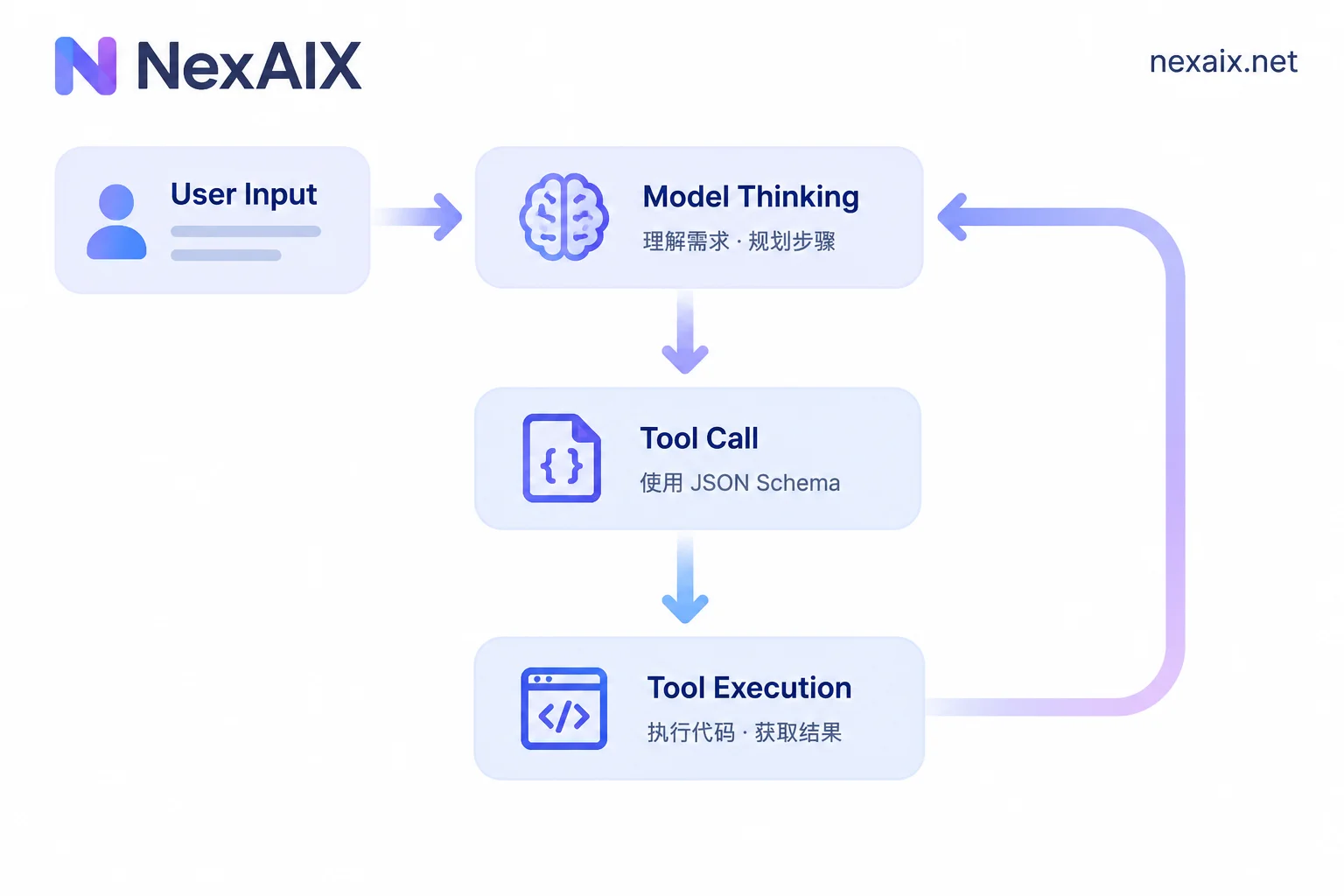
This mechanism imposes four verification points on API endpoints:
- Passthrough of tool call parameters: The endpoint must fully support
tools,tool_choice, andstrict: true, and must not swallow these parameters or return malformed responses. - Complete retention of long context: Each round's thinking, tool inputs, and large tool return texts accumulate in the request history. After a few rounds, tens of thousands of tokens may be consumed. If the endpoint implicitly truncates, the Agent loses its task memory.
- Clear rate limit quotas: An Agent may issue a dozen or more inference requests consecutively to complete a single user instruction. The endpoint's RPM/TPM limits must be public and predictable; otherwise, you'll encounter sudden 429 errors in production.
- State tracking after tool returns: In multi-turn conversations, each
tool_call_idmust correspond correctly. If the endpoint alters or loses the ID, the Agent may loop indefinitely.
If you use frameworks like LangChain or CrewAI, they already encapsulate the ReAct loop or multi-agent collaboration logic. You only need to provide a reliable underlying model API.
Integrate by Changing One Line of Configuration in Your Framework
Mainstream Agent frameworks are compatible with OpenAI's interface protocol. To connect to a third-party API, you only need to modify base_url and api_key; no need to switch SDKs or change business code.
LangChain example (Python):
from langchain_openai import ChatOpenAI

llm = ChatOpenAI(
    base_url="https://api.nexaix.net/v1",  # 只改这一行
    api_key="your-api-key",
    model="gpt-4o"
)
The framework automatically appends /chat/completions after base_url, so you don't need to write the full path. If your project uses environment variables for configuration, just change two environment variables:
export OPENAI_BASE_URL="https://api.nexaix.net/v1"
export OPENAI_API_KEY="your-api-key"
CrewAI example:
from crewai import Agent, Task, Crew
import os

os.environ["OPENAI_BASE_URL"] = "https://api.nexaix.net/v1"
os.environ["OPENAI_API_KEY"] = "your-api-key"

researcher = Agent(
    role="Research Analyst",
    goal="Find and analyze data",
    llm="gpt-4o"  # 直接指定模型名
)
CrewAI reads OPENAI_BASE_URL from environment variables, so you don't need to pass it repeatedly in each Agent initialization.
Specific Checks for the Four Verification Points
1. Are tool call parameters fully passed through?
Send a test request with tools and check the returned tool_calls format:
response = llm.invoke(
    messages=[{"role": "user", "content": "北京今天天气如何?"}],
    tools=[{
        "type": "function",
        "function": {
            "name": "get_weather",
            "parameters": {
                "type": "object",
                "properties": {
                    "location": {"type": "string"}
                },
                "required": ["location"]
            },
            "strict": True
        }
    }]
)
A normal response should include response.tool_calls, containing id, function.name, and function.arguments. If the endpoint does not support strict: True, or the returned arguments is not valid JSON, the endpoint's tool call support is incomplete.
In production, it's recommended to enable Strict Mode, which forces the model to output parameters strictly conforming to the Schema, avoiding parsing errors later.
2. Is long context implicitly truncated?
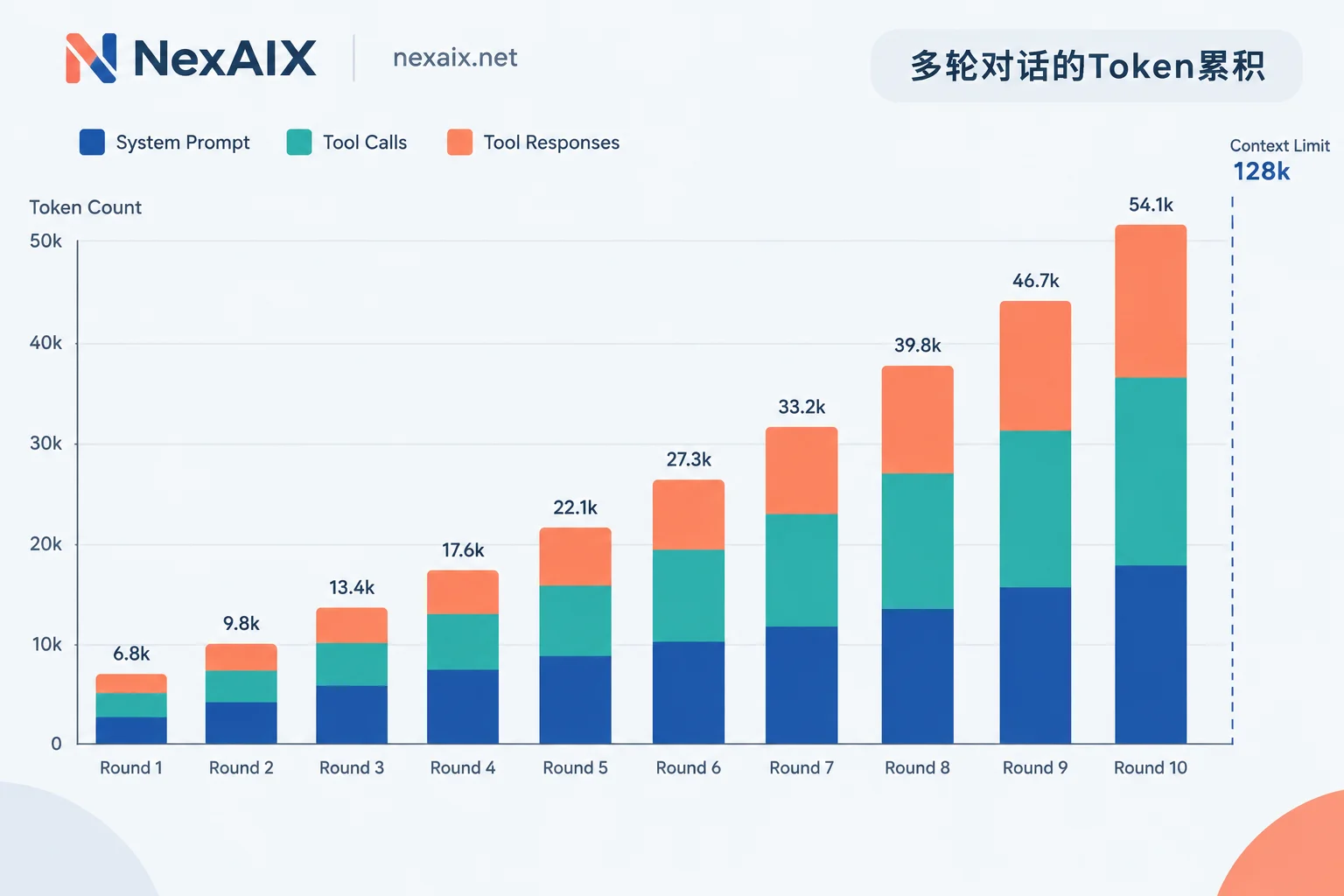
Agents rapidly accumulate tokens during multi-turn tasks. Suppose each round (thinking + tool call + tool return) consumes 5000 tokens; ten rounds equal 50,000 tokens. If the model claims to support 128k context but the endpoint actually retains only the last 32k, the Agent loses earlier task memory, leading to repeated tool calls or forgetting the user's initial instruction.
Troubleshooting methods:
- Check the returned
usagefield: After each request, inspectprompt_tokens; it should increase incrementally each round. If it suddenly decreases in a round, truncation occurred. - Embed markers in conversation history: Add a unique text (e.g.,
[CONTEXT_MARKER_12345]) in earliersystemorusermessages, then ask the Agent to repeat this content at round ten to see if it can find it.
If the endpoint doesn't disclose its actual context window retention policy, or claims 200k but only reliably handles 32k in practice, it's not suitable for long-running Agent tasks.
3. Are rate limit quotas clear and sufficient?
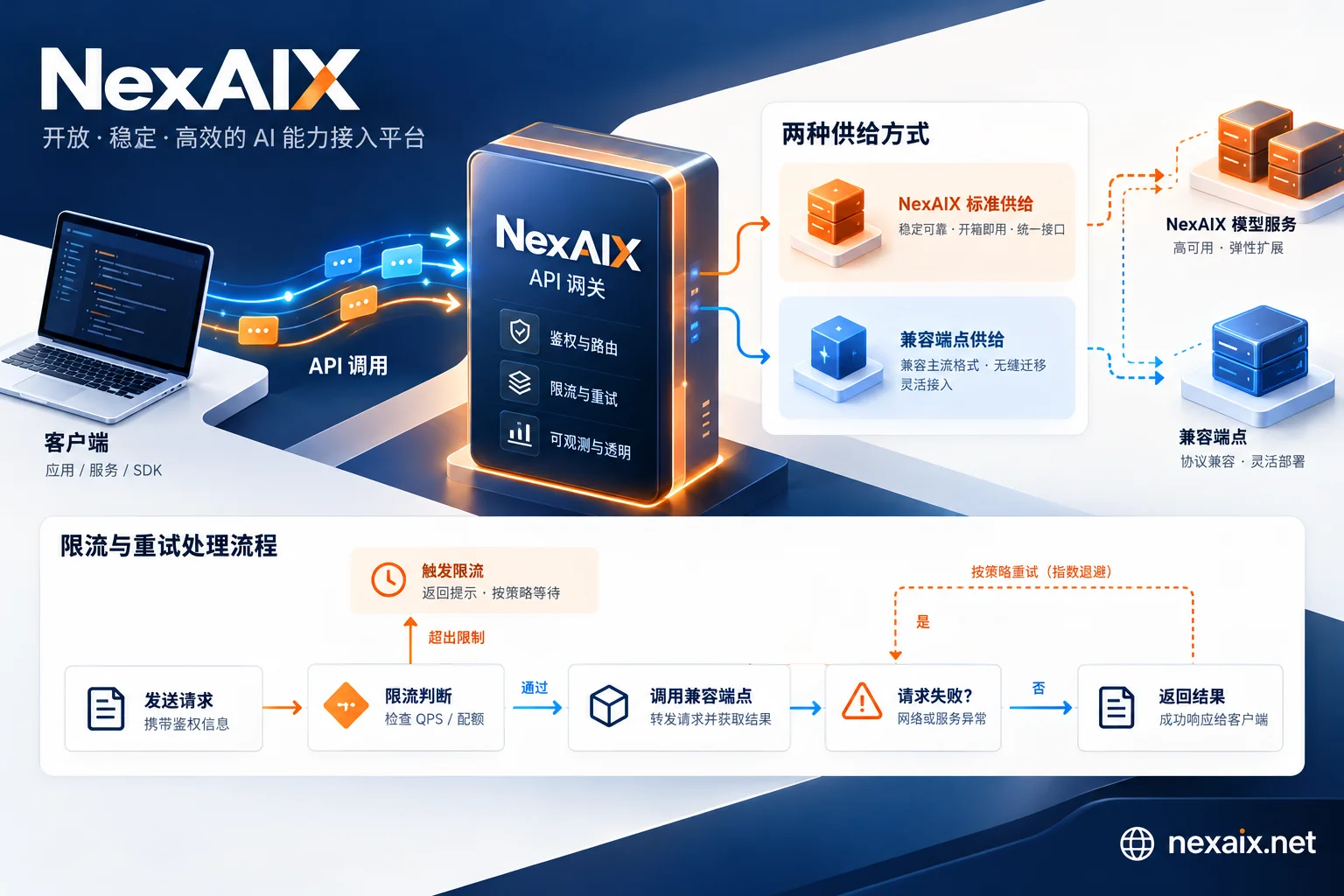
A single Agent task may issue 10-20 consecutive inference requests, with intervals possibly only a few hundred milliseconds. If the endpoint's RPM (requests per minute) or TPM (tokens per minute) limits are opaque, or rate-limited responses lack a retry-after header in the 429 response, your Agent will frequently stall.
Checklist:
- Does the endpoint publicly disclose RPM/TPM quotas for each model?
- Do rate limit responses return standard
retry-afterorx-ratelimit-reset-requestsheaders? - Does it support per-API-Key quota isolation (essential when multiple projects share an endpoint)?
If your Agent task averages 15 inference rounds and each round consumes 8000 tokens, a single task uses 120,000 tokens. Assuming the endpoint's TPM is 400,000, you can theoretically run only 3 such tasks per minute. If your application has multiple users concurrently triggering Agents, this quota will quickly be maxed out.
In production, it's recommended to combine with exponential backoff retries, but only if the endpoint's rate limit responses are standardized.
4. Is the ID correspondence correct after tool returns?
This issue typically arises when the endpoint's implementation of the OpenAI protocol is incomplete. Each call in the model's returned tool_calls has a unique id (format like call_abc123). After executing the tool, you must include the corresponding tool_call_id in the tool message sent back. If the endpoint alters or loses this ID during forwarding, the model cannot match results and will repeatedly call the same tool.
Test method: Print the complete JSON for each request and response to confirm tool_call_id remains consistent during the round trip.
What to Look for When Choosing an Underlying API
With the verification points clear, you have concrete criteria for choosing an Agent's underlying API. Beyond the model's inherent capabilities (reasoning quality, context length), focus on three engineering attributes:
Transparency of supply method: Is the endpoint a direct official API from the model vendor, or a proxy layer? If a proxy, does it deploy open-source models with its own compute, or forward traffic to closed-source vendors? This determines whether you can trace the actual model version and configuration. For relays like NexAIX, each model page indicates whether it's "open-source weights deployed on own compute" or "official authorized channel for closed-source models," so you know exactly where requests end up.
Commitment to no downgrading: Some endpoints secretly switch to smaller models, reduce precision, or cut context windows to save costs. Verification methods are detailed in this article; the core is comparing the official interface's model field, actual context retention length, and consistency of inference results. If an endpoint publicly commits to "no smaller models, no precision reduction, no context cutting" and provides verification methods, its credibility is much higher.
Visibility of quotas and rate limits: You need to know the RPM/TPM for each model and whether they are isolated by API Key. Per-Key isolation means your development, testing, and production environments can use different Keys, each with independent quotas and usage. If the endpoint only provides account-level total quotas, multiple projects will compete, and Agent tasks may be rate-limited during peak times.
For specific integration, first check the NexAIX model list to confirm the supply method for your desired model, then modify base_url and api_key according to the examples in the integration documentation. After registration, you'll receive test credits to run a few Agent tasks and verify the four points above.
Common Causes of Agent Stalling or Looping
If your Agent behaves abnormally in production, check in order of priority:
- Check the
usage.prompt_tokensof the latest request: If it's near the model's context limit, too many historical messages have accumulated. You need message compression or window sliding at the framework level. - Check the size of tool return content: Some tools (e.g., search APIs) return thousands of lines of JSON; stuffing all into conversation history quickly exhausts context. Production practice is to truncate at the tool layer, keeping only key fields.
- Confirm the frequency of 429 responses: If rate limiting occurs multiple times per minute, either increase the endpoint's TPM quota or add a request queue at the application layer.
- Verify the correspondence of
tool_call_id: In framework logs, print each round'stool_callsand the returnedtoolmessage to confirm ID matching.
For multi-turn long tasks, it's recommended to combine streaming output to reduce wait time per request, and use a retry mechanism as a fallback after timeouts.
Summary
An Agent's stability directly depends on the underlying API's quality of support for tool calling, long context, and rate limiting. Changing one line of base_url during integration is only the first step; the key is verifying four points during testing: tool parameter passthrough, complete context retention, public rate limit quotas, and correct tool ID correspondence. When choosing an endpoint, prioritize transparency of supply method, commitment to no downgrading, and per-Key quota isolation—these attributes affect production usability more than price or model count alone.


Comments(0)