 NexAIX-官方博客
Explicitly setting include_byok_in_budgets to true in the Guardrail or management API is the first step to closing the quota leakage loophole. Simply setting a gateway-level Budget Limit often fails to block spending generated by Bring Your Own Keys (BYOK) calls, as mainstream platforms by default only track their own credit consumption. For enterprises facing quota allocation challenges with shared API keys, tech leaders must understand the underlying logic of BYOK budget disconnection and build a complete defense through credential binding and member isolation.
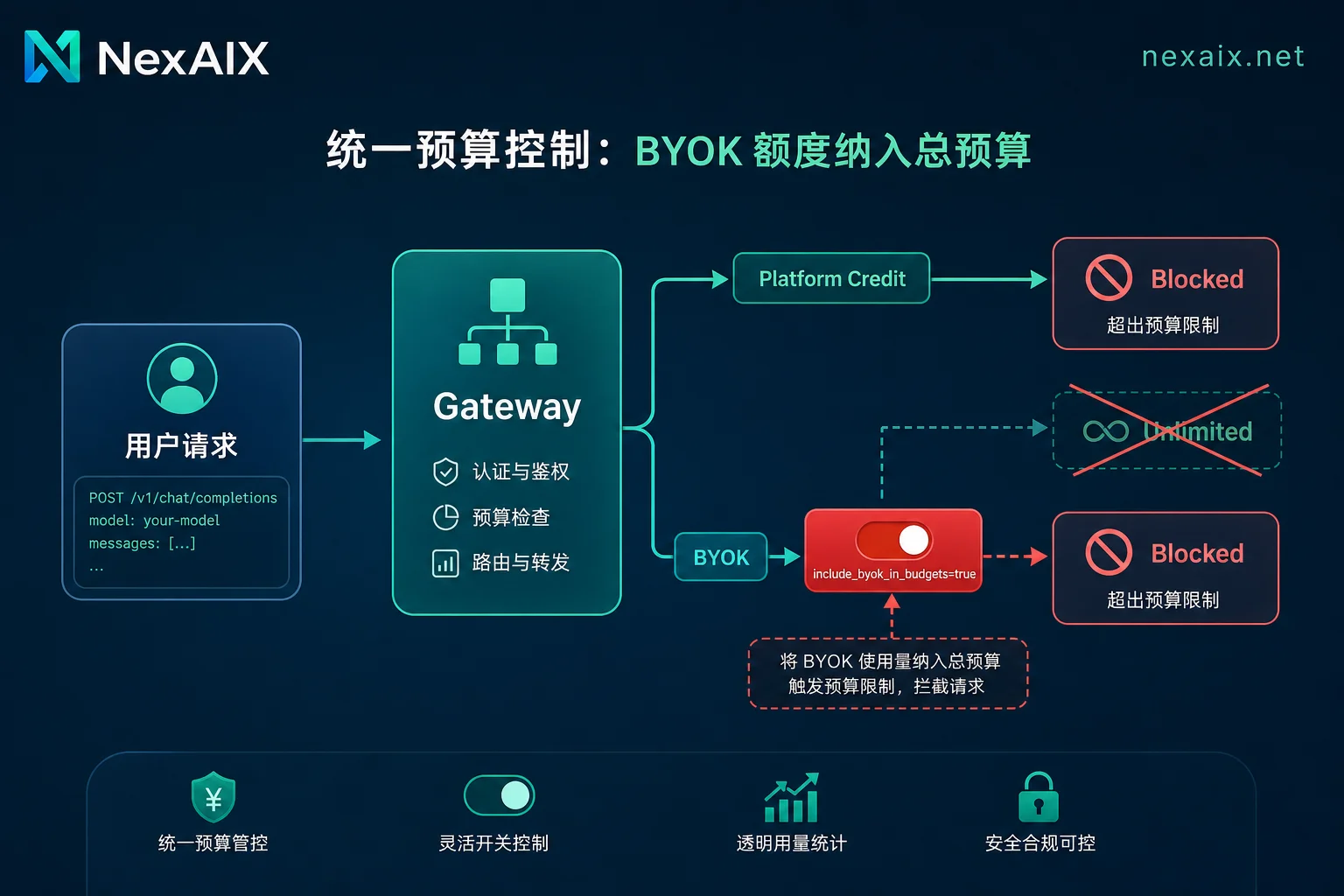
Budget Limit Does Not Block BYOK by Default
Many teams discover that despite setting strict spending caps on aggregation platforms, they still receive unexpectedly high bills from upstream model providers at month-end. This is because mainstream gateways like OpenRouter, by default, only track internal credit consumption for Guardrail budget limits. When developers use BYOK (Bring Your Own Keys) for calls, this inference spending bypasses the gateway's budget tracking module entirely.
Official documentation confirms this behavior: without proactive intervention, the gateway treats BYOK traffic as "external settlement" and does not participate in local balance deduction or blocking. This design aims to separate platform service fees from third-party compute costs, but in multi-team shared scenarios, it creates a significant financial risk exposure. If a sub-team script abnormally hits the BYOK channel, the gateway won't trigger a 429 error, causing upstream bills to grow without limit. Therefore, understanding this default behavior is a prerequisite for effective quota control, not just relying on surface-level budget numbers. OpenRouter's documentation updated on September 3, 2026, confirms this default behavior.
Three-Layer Configuration Order and Functional Positioning
To prevent quota penetration in shared-key scenarios, a strict configuration priority must be followed. Incorrect order may lead to rule conflicts or ineffective blocking. The correct execution path is as follows:
Enable BYOK Budget Inclusion
Before any protection policy takes effect, the include_byok_in_budgets parameter must be explicitly set to true in the Guardrail configuration or management API. This step applies globally or at the workspace level, forcing the gateway to estimate the cost of BYOK calls and include them in the unified budget pool. If this step is skipped, all subsequent amount-based blocking rules will be ineffective for BYOK traffic.
API Key Filter Restricts Usable Credentials
After enabling budget integration, use the API Key Filter to restrict the shared key to only a specific list of upstream credentials. This configuration addresses the "who can use which models" issue. For example, prohibit ordinary development teams from accessing expensive BYOK channels for GPT-4o or Claude 3.5 Sonnet, allowing only specific high-privilege credentials. The core function of API Key Filter is resource access control.
Member Filter Restricts Eligible Users
Finally, implement user-level isolation through Member Filter. This determines which team members or sub-applications can use the filtered credential set. Member Filter restricts which members or sub-apps can use the key, ensuring that even with a valid API key, unauthorized members cannot make calls. These three layers together form a complete closed loop from fund statistics to resource access to user authorization.
| Configuration Layer | Core Parameter/Function | Scope | Primary Purpose |
|---|---|---|---|
| Budget Sync | include_byok_in_budgets=true | Global/Workspace | Ensure BYOK spending is included in total limits |
| Credential Filter | API Key Filter | Key level | Restrict usable upstream models/credentials |
| Member Isolation | Member Filter | User/Team level | Restrict who can call this key |
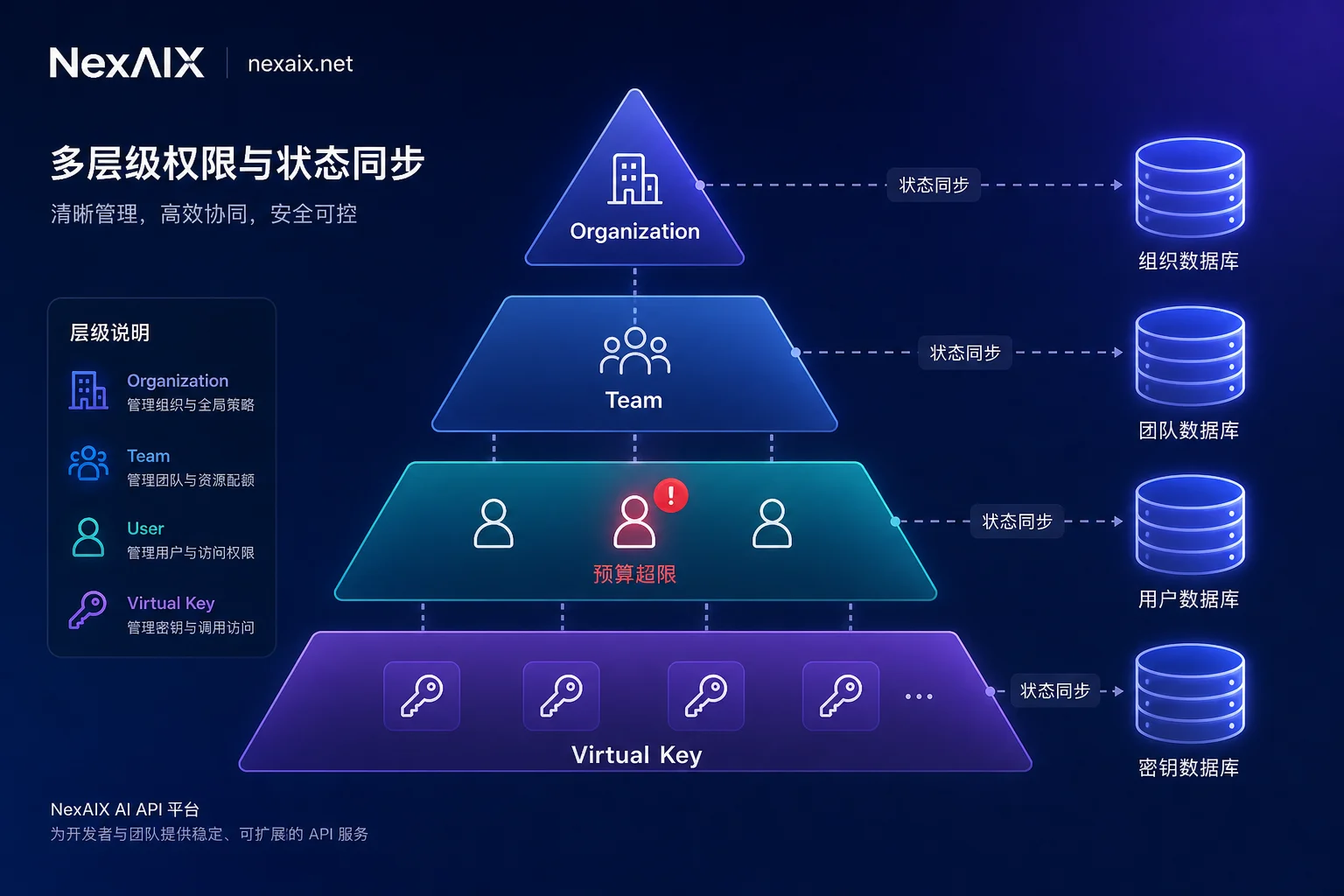
Tiered Budgets and Virtual Keys Linkage
LiteLLM's August 2026 documentation shows a four-tier linkage architecture. Besides OpenRouter's Guardrail mechanism, gateways like LiteLLM and Portkey employ a more granular Virtual Keys architecture to meet the need of limiting call permissions by team member. In this architecture, the real physical API key is abstracted into multiple virtual keys, each with its own budget policy.
These gateways support four-tier linkage: Organization, Team, User, and Key. When any tier hits the periodic (daily/weekly/monthly) amount or token limit, blocking is triggered immediately. This hierarchy allows enterprises to set an overall cap at the organization level while allocating specific sub-quotas at the team or individual level. For example, the AI R&D department gets a total monthly quota of $10,000, with the backend team allocated $6,000 and the frontend team $4,000. When the backend team exceeds its quota, only the backend team's virtual key is frozen, without affecting frontend operations.
However, the reliability of such multi-tier budgets heavily depends on the state consistency of the persistent database. If the gateway uses a stateless architecture and fails to correctly associate tenant context, or if there is asynchronous disk-write latency between Redis cache and Postgres database, minor overages may occur in high-concurrency burst scenarios. More critically, if the database connection fails, some gateways may trigger a Fail-open logic, temporarily skipping budget checks to ensure service availability, leading to quota penetration. Additionally, Fallback mechanisms can become a bypass. If the primary model returns an error due to quota exhaustion, the gateway automatically switches to a backup endpoint. If the backup endpoint is more expensive or not monitored under the same budget pool, this automatic switch can accelerate sub-team quota consumption. When configuring multi-tier budgets, ensure that Virtual Keys are correctly bound to all fallback paths and verify that budget deduction logs reflect every routing change in real time.
Suggested troubleshooting order:
- Check whether Virtual Keys cover all possible model routing branches.
- Confirm the connection stability and latency metrics between the gateway and the persistent database (e.g., Postgres).
- Audit budget deduction logs, comparing gateway records with upstream invoices for any time difference caused discrepancies.
| Gateway Type | Budget Tier Support | Reset Period Options | Blocking Granularity | Typical Use Cases |
|---|---|---|---|---|
| LiteLLM | Org/Team/User/Key | Daily/Weekly/Monthly | Precise to Token/Amount | Private deployment, strict RBAC |
| Portkey | Workspace/Project | Custom period | Integrated Rate Limits | SaaS multi-tenancy, alert thresholds |
| OpenRouter | Workspace/Credit | Manual/Auto | BYOK combined calculation | Public cloud fast integration |
Note: The table is compiled based on public documentation from each gateway. For Portkey's specific threshold names and OpenRouter's credit refresh mechanism, refer to the latest official docs.
Gateway Credential Governance Capability Comparison
Different gateways vary significantly in BYOK governance. The table below compares key capabilities of mainstream gateways, helping technology selectors assess whether existing infrastructure meets the security requirements for sharing API keys across multiple teams.
| Feature | OpenRouter | LiteLLM | Portkey | NexAIX |
|---|---|---|---|---|
| BYOK Budget Inclusion | Requires explicit enable include_byok_in_budgets | Supports unified billing pool | Supports combined strategies | To be verified on official website |
| Credential Filter Granularity | API Key Filter (whitelist) | Model/Provider level | Provider level | To be verified on official website |
| Member-level Isolation | Workspace level | User/Team/Key four tiers | Project/User level | To be verified on official website |
| Periodic Reset | Manual/Automatic credit refresh | Daily/Weekly/Monthly auto reset | Custom Alert Threshold | Documentation mentions rate limits and quotas; specifics need verification on model page |
NexAIX has published documentation on rate limits and quotas, error codes, status page, and enterprise contract evaluation. For specific support regarding BYOK budget inclusion switch and credential filter granularity, readers need to verify the current version on their model page and documentation center to confirm whether it meets their multi-team compliance requirements.
Post-Configuration Testing: Verify Budget Enforcement
After configuration, an end-to-end validation test is essential to confirm that BYOK calls are included in budget tracking. The verification steps should simulate real production traffic:
- Construct an over-budget request: Use a credential bound to BYOK to send a request with an estimated cost slightly above the remaining quota.
- Observe the response status code: Confirm that the gateway returns HTTP 429 Too Many Requests or a specific budget exceeded error code, rather than forwarding the request successfully.
- Check error message: Verify that the response body's error message explicitly states "budget exceeded" or "insufficient credit," not a vague server error.
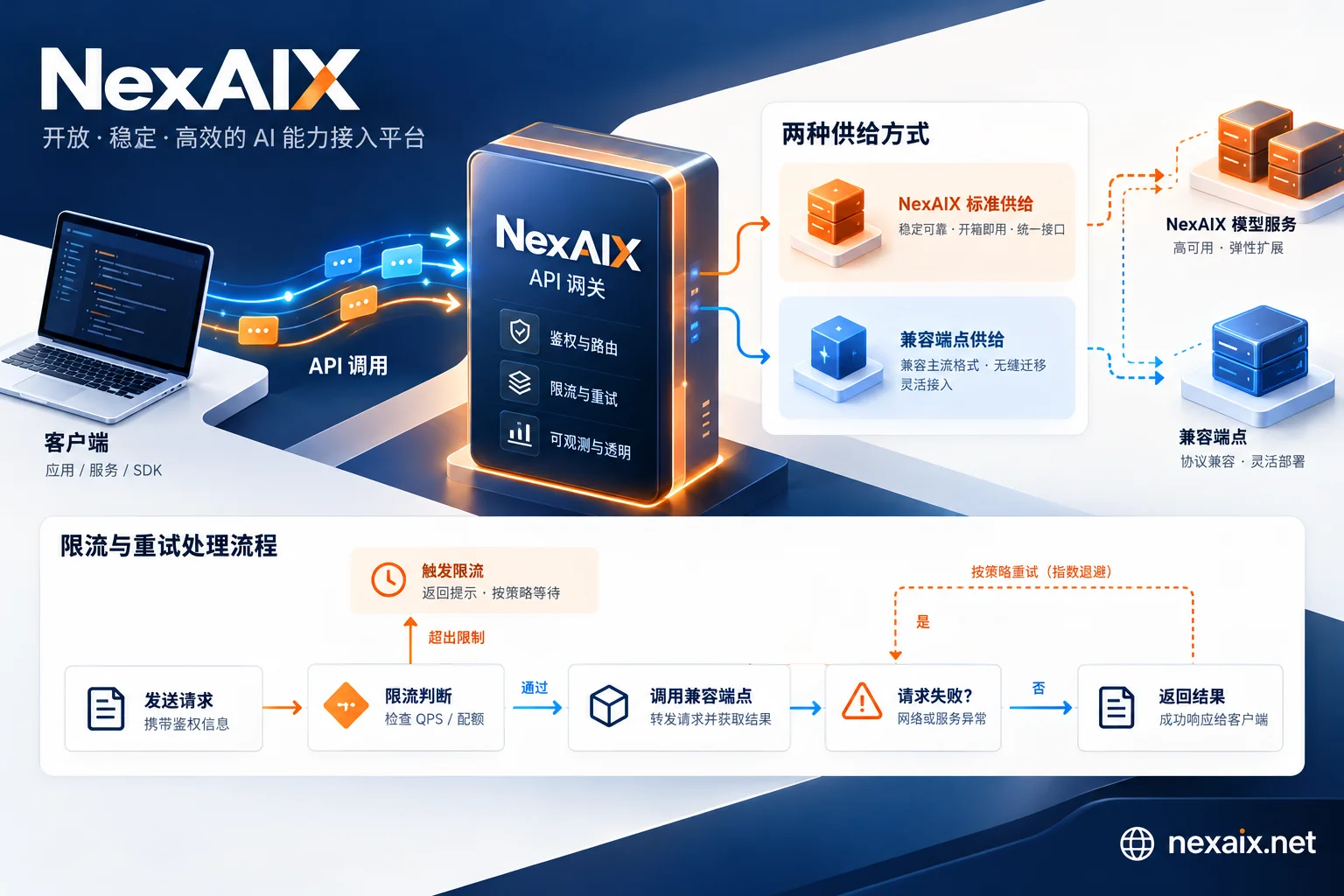
If the test shows that the request was not blocked, immediately check the status of the include_byok_in_budgets switch and database health. Consider implementing an exponential backoff retry strategy to avoid missing checks due to transient concurrency.
Weighted Cost Allocation for Shared Key Spending
In multi-team shared key scenarios, financial allocation requires precision to each call. Assume three teams share a key, and we need to allocate costs based on actual call logs. The following example is based on fictional team numbers, credential types, and unit prices.
Let Team A use only BYOK, Team B uses a mix, and Team C uses only platform credit.
- Unit price reference: Assume input $3/1M tokens, output $15/1M tokens.
Team A: 10M input tokens, 2M output tokens. All via BYOK.
- Cost = (10 3 + 2 15) = $60.
Team B:
- BYOK portion: 5M input tokens, 5M output tokens. Cost = (5 3 + 5 15) = $90.
- Platform portion: 5M input tokens, 5M output tokens. Cost = (5 3 + 5 15) = $90.
- Total cost = $180.
Team C: 8M input tokens, 8M output tokens. All via Platform Credit.
- Cost = (8 3 + 8 15) = $144.
| Team | Credential Type | Input Tokens (M) | Output Tokens (M) | Input Unit Price ($) | Output Unit Price ($) | Allocated Cost ($) | Notes |
|---|---|---|---|---|---|---|---|
| Team A | BYOK | 10 | 2 | 3 | 15 | 60 | Billed after splitting by provider_type=byok |
| Team B | Mixed | 10 | 10 | 3 | 15 | 180 | Billed after separate statistics by provider_type |
| Team C | Platform | 8 | 8 | 3 | 15 | 144 | Directly deducted from Credit |
| Total | - | 28 | 20 | - | - | 384 | Total gateway displayed spend |
This table demonstrates how to reconstruct the true cost burden for each team by distinguishing credential types and input/output ratios. The key is that gateway logs must clearly mark the provider_type (BYOK vs Platform) for each request, as well as the token_usage details. If the gateway does not support BYOK cost estimation, such precise allocation is impossible—another strong business reason to enable budget synchronization.
FAQ
Why did I still blow up the upstream bill even after setting a Budget Limit?
Because by default, spending from BYOK (Bring Your Own Keys) is not counted toward the gateway's Budget Limit. The gateway only tracks internal credit consumption. You need to explicitly enable the include_byok_in_budgets switch so that the gateway estimates and combines BYOK costs, enabling overage blocking.
Can API Key Filter and Member Filter be used independently?
Yes, but with different impacts. API Key Filter restricts "which upstream credentials are usable," serving as resource access control. Member Filter restricts "who can use this key," serving as identity permission control. If you enable only the former, everyone can still call restricted credentials; if only the latter, specific users can still call all credentials. It's recommended to combine both to enforce the principle of least privilege.
Is it common for BYOK calls not to count toward budgets across all gateways?
Not all gateways behave this way, but public cloud gateways like OpenRouter do by default. Open-source gateways like LiteLLM typically manage all costs through a unified database state, but only if hierarchical budgets are correctly configured. Check each gateway's documentation for its default handling of BYOK costs.
How can I verify that budget deductions are real-time, not delayed?
Check whether the gateway uses a strongly consistent database (e.g., Postgres) as the source of truth for budget state, rather than an eventually consistent cache (e.g., Redis). Redis may have millisecond-level latency under high concurrency. Use a load test script to send continuous small requests and observe whether the N+1 request immediately returns 429 the moment the balance reaches zero, to confirm real-time capability.
When multi-tier budgets trigger blocking simultaneously, which error code is returned?
Different gateways have varying multi-tier interception strategies and error code designs. Please refer to your gateway's error code documentation to see if it indicates the triggering tier in the response body.
Can quota penetration be retroactively deducted?
Most gateways do not support automatic retroactive deduction of BYOK expenses, as these funds are paid directly to upstream providers. Gateways can only log the expense for reporting. If penetration occurs, manual intervention is required: calculate the overage from logs and manually deduct the corresponding credit in the next budget period, or use internal financial processes to recover costs from the responsible team.


Comments(0)