 NexAIX-官方博客
When dealing with AI API 429 errors, remember one principle: don't blindly add retries. Instead, classify the 429 into four causes based on three fields, then decide whether to change code, upgrade tiers, or recharge. OpenAI's 2026 documentation splits 429 into three error types: rate limit, project spend limit exceeded, and prepaid balance exhausted. DeepInfra, in June 2026, launched the service_tier: 'priority' priority tier to alleviate peak congestion—these two together form a complete 429 handling chain.
Read the Response Body and Headers: How to Immediately Distinguish Four Causes of AI API 429
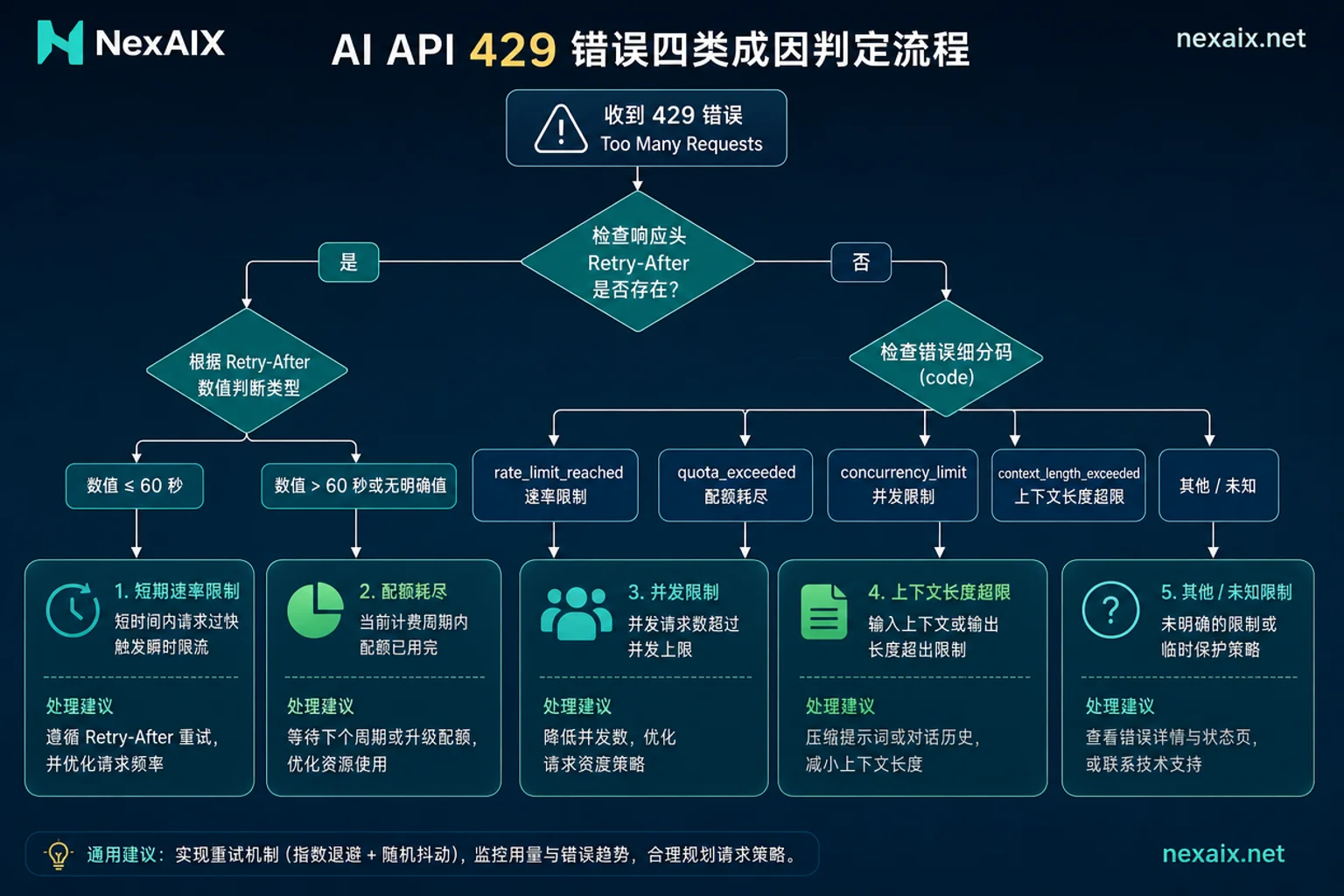
When you get a 429, first check two things: the error subtype in the response body and the Retry-After field in the response headers. The error subtype directly tells you if it's rate limiting, project spend limit, or balance exhaustion; Retry-After gives the minimum seconds the server asks you to wait. Then use concurrency gradient and cross-time sampling as a second layer to separate temporary rate limits from persistent bottlenecks.
| Symptom | Judging Signal | Action Direction |
|---|---|---|
| Immediate 429 after high request volume in a short time | Error body rate_limit_reached, short Retry-After | Retry with backoff, reduce QPS if necessary |
| Persistent 429, error body project_spend_limit_exceeded | Project spend limit reached | Adjust project quota or budget; retries are ineffective |
| Error body credit_balance_exhausted | Prepaid balance exhausted | Recharge; retries are ineffective |
| 429 when concurrency increases | Concurrency gradient test shows a turning point | Set safe concurrency level or buy priority tier |
| 429 at fixed times, normal otherwise | Provider peak congestion | Consider priority tier or switch provider |
| Same idempotency key fails repeatedly in a short time | Retry storm characteristics | Add jitter, limit max retry count |
Error code classification and Retry-After specifications in this article follow OpenAI's official documentation as of July 2026; specific RPM/TPM thresholds vary by account tier and provider, so refer to your provider's documentation.
Cause 1: Account-Level Rate Limits (RPM/TPM) Exhausted—How to Confirm with Request Logs
Officially, account-level rate limits are split into two independent axes: requests per minute (RPM) and tokens per minute (TPM). Many teams only watch QPS and find "QPS isn't high but still limited"—often long contexts fill the TPM axis. The confirmation method is simple: aggregate request logs by minute, with fields including request ID, model name, token counts in request and response, timestamp, and status code, and see if 429s concentrate on long-context requests. If so, the issue isn't concurrency but token consumption pace; you need to reduce per-request token usage via caching, summarization, or model selection.
Cause 2: Concurrency Limit Triggered—How to Find the Collapse Point with Concurrency Gradient Testing
What does it mean when increasing concurrency causes 429? Often it's not provider failure but crossing your own concurrency collapse point. Self-test method: starting from current concurrency, increase in fixed gradients (e.g., 20, 40, 80, 160), run each gradient for 3-5 minutes, and record 429 ratio and time-to-first-token. When the 429 ratio jumps from near zero to above 10%, or time-to-first-token shows an obvious turning point, that's your collapse concurrency. Multiply it by 0.7 as your production safe tier, and keep queue depth in a range that absorbs jitter. The 10% and 0.7 are common engineering starting points; use your own load test's turning point, as differences across providers and account tiers are significant. This step avoids blindly buying higher tiers and prevents misjudging concurrency limits as provider failures.
Cause 3: Is 429 Rate Limiting or Insufficient Balance? How to Judge Billing-Side Limits
Many teams mistakenly think AI API 429s are always rate limits—but according to OpenAI's error body classification, project spend limit exceeded (project_spend_limit_exceeded) and prepaid balance exhausted (credit_balance_exhausted) also return as 429. These 429s won't succeed with more retries because they aren't temporary states. In monitoring, separate alerts for these two types of 429s from temporary rate limits: the former goes to recharge or adjust project quota, the latter goes to backoff retry. The cost of misjudgment is that retry storms can drag down otherwise available requests while billing issues go unnoticed.
Cause 4: Provider-Side Peak Congestion vs. Client Retry Storms—How to Sample Across Time Periods
If you consistently get 429 during peak hours, there are usually two possibilities: provider-side congestion or your own retry storm. Approach: use a fixed probe request with the same model and input, sample in the morning, midday, evening, and weekends, and see if 429s follow a time pattern. If the pattern is consistent, it's provider-side congestion; if it's random throughout the day and accompanied by rapid repeated failures of the same request, it's a client retry storm—most commonly caused by fixed-interval retries without jitter, amplifying a single rate limit into persistent 429s. Identifying feature: same idempotency key receives multiple 429s within 10 seconds.
How to Write Retries: Retry-After Priority, Exponential Backoff with Jitter, Timeout Budget, and Idempotency Keys
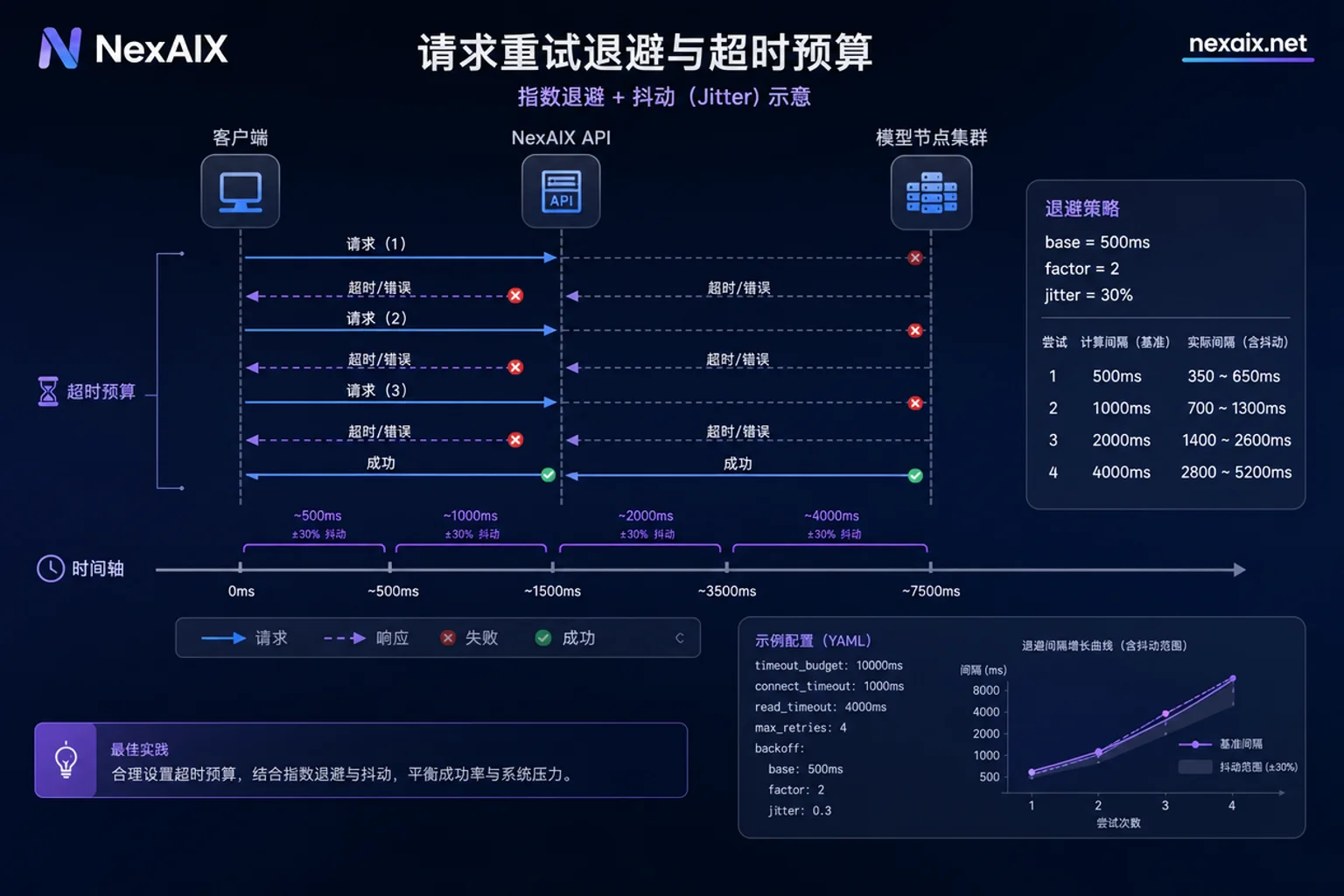
There's no universal retry interval for AI API 429, but the priority is clear: if a Retry-After header is present, respect its seconds; otherwise, use exponential backoff with jitter. The pseudocode structure is as follows:
retry_count = 0
max_retries = 3
base_delay = 1s
max_delay = 60s
timeout_budget = 30s
do {
  response = call()
  if response.status == 429:
    delay = parse_retry_after(response.headers) ?? (base_delay * (2^retry_count) + random(0, 0.25 * base_delay * (2^retry_count)))
    if retry_count < max_retries and elapsed_time < timeout_budget: sleep(delay)
    else: break
    retry_count++
  else: break
}
There are four key variables: respect Retry-After, exponential backoff with jitter, max retry count, and overall timeout budget. Requests must carry an idempotency key to avoid duplicate side effects. Also add backpressure to the queue; when the 429 ratio rises, proactively lower production rate rather than relying on retries.
New Protocol-Level Solution: What service_tier Priority Tier Solves and What It Doesn't
DeepInfra's June 2026 launch of service_tier: 'priority' is an industry trend: pass this parameter in the OpenAI-compatible interface chat/completions, charged at 1.5x standard real-time unit price, requests skip queues and get protective admission. It mainly alleviates "provider peak congestion type 429s" and suits latency-sensitive production requests. But it doesn't solve your account quota exhaustion, balance exhaustion, or client retry storms—those need handling per the previous sections. The boundary is as follows:
| Scenario | Change Code | Buy Priority Tier | Switch Provider |
|---|---|---|---|
| Rate limit exceeded | ✅ Backoff + reduce QPS | Usually not needed | Can compare |
| Balance/quota exhausted | ❌ Ineffective | ❌ Ineffective | Doesn't solve root cause |
| Concurrency ceiling | ✅ Set safe concurrency | Can delay | Can compare |
| Peak congestion | ⚠️ Only mitigates | ✅ Effective | Can compare |
Returning 429 Honestly vs. Silent Downgrade: How to Define Reliability Standards
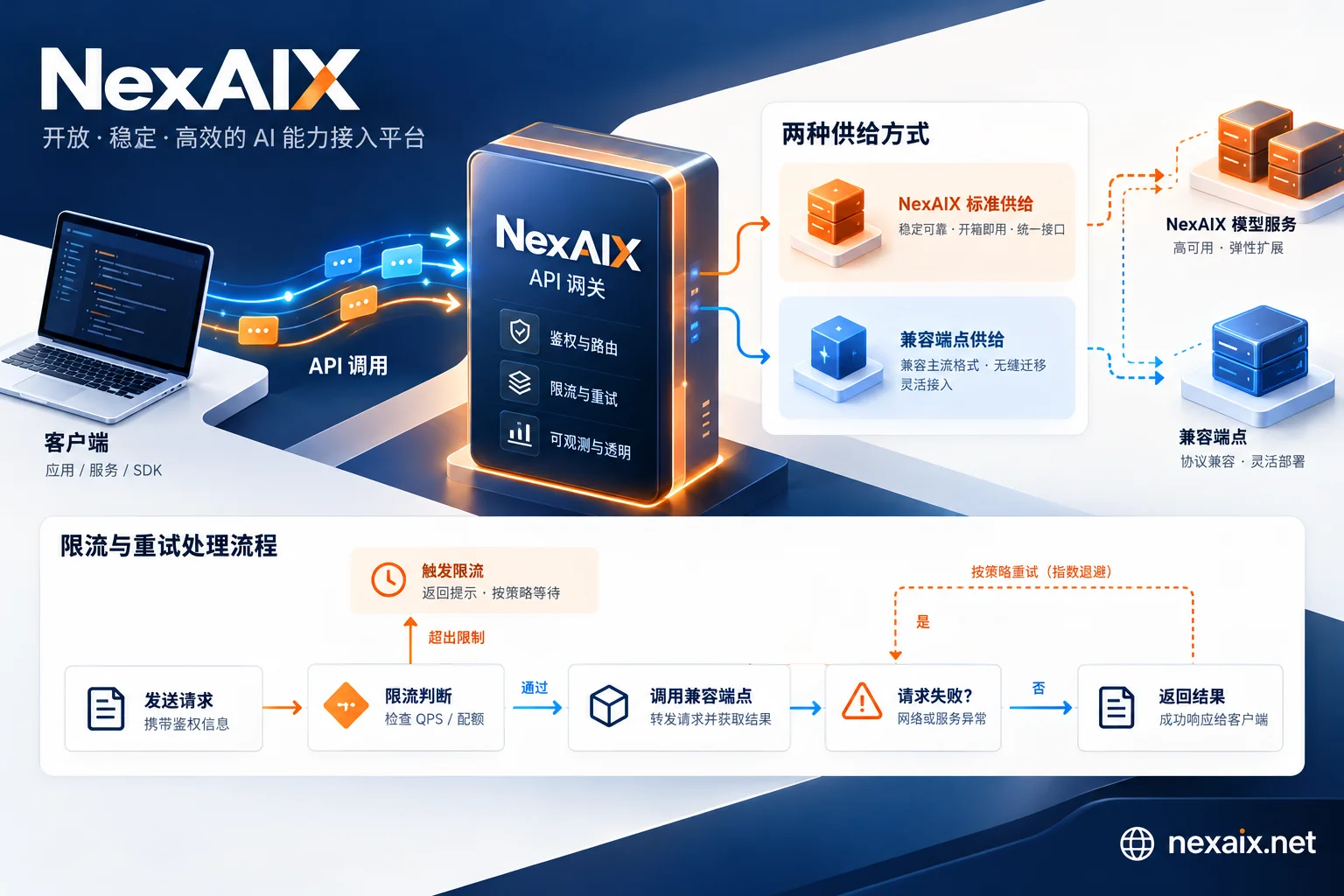
Should you return 429 to the caller during peak times or silently switch to a cheaper model? From a reliability perspective, the former is more controllable: standard 429s can be smoothed by backoff strategies and logs are accountable; the latter distorts both model quality and cost accounting. NexAIX's official website states: when models are fully loaded, it returns standard 429 with retry suggestions, does not silently switch models, the response body's model field corresponds to the actual executed model, and retains request ID, model name, token counts, timestamp, status code, and other troubleshooting metadata—these are exactly the data foundation for the 429 classification aggregation and retry amplification factor calculation above. In production, it's recommended to use such verifiable standards, and you can also refer to the migration points in the article on OpenAI-compatible API, and verify current standards with NexAIX's rate limits and quotas, error code documentation, and status page.
Production Implementation Checklist: Actionable Checks and Monitoring Metrics for This Week
The following checklist can be directly used to audit your service's AI API 429 handling.
- [ ] Count 429 by error code subtype (at least distinguish rate_limit / spend_limit / balance_exhausted)
- [ ] Calculate Retry-After compliance rate: actual wait seconds vs. required seconds in response header
- [ ] Calculate retry amplification factor: total actual requests sent in a time window / original requests initiated by the business side (greater than 2 indicates over-aggressive retries)
- [ ] Use concurrency gradient testing to locate the collapse point and set production safe concurrency and queue depth
- [ ] Track 429 ratio by model, watch for anomalies in long-context models
- [ ] Establish cross-time baselines to distinguish provider congestion from your own issues
- [ ] Separate alerts for billing-side 429s from temporary rate limits
- [ ] After changes, perform regression validation: retry parameters, concurrency tier, priority tier switch all tested
For migration or comparison testing, you can use NexAIX's test quota and base_url https://api.nexaix.net/v1 to verify with the same codebase; specific specifications are per the Self-owned Compute AI API page; for cost calculation, refer to the metrics in AI API Cost Optimization.
FAQ
Should I switch providers immediately on 429?
Not recommended. First complete the four-cause classification: if it's balance or quota issues, switching providers won't solve it; if it's peak congestion, first consider buying priority tier or using a temporary backup channel. Only after cross-time sampling confirms the provider consistently fails to meet standards should you consider switching, and before migration, load test with the same request pattern.
Is it worth paying for priority queue?
It's worth it if: your 429 is peak congestion type, your application is latency-sensitive, and willingness to pay covers the 1.5x unit price. If it's quota issues or your own retry storm, buying it won't help. Recommend running metrics for a week before deciding.
How to distinguish 429, 503, and timeouts?
429 is rate limiting/quota, with Retry-After header; 503 is service unavailable, usually without Retry-After, often due to server overload or maintenance; timeout is when the request doesn't return within the time limit, possibly network or server slowness. Monitoring should have separate alert types for these three; otherwise, real capacity issues may be masked.
How to handle mid-stream 429 on streaming requests?
Mid-stream 429 is harder to recover gracefully. Best practice: do a quota pre-check before the request and set a short timeout; if 429 occurs mid-stream, immediately stop the current stream, retry the entire request with backoff (with idempotency key), rather than parsing partial chunks. Log the number of tokens received for reconciliation.
How to allocate quotas in multi-tenant scenarios?
You can set tenant-level token buckets, with independent rate limits per tenant to avoid a single tenant exhausting the global quota. 429s should record tenant ID and track failure rates by tenant for transparency. If sharing an account, confirm with the provider whether sub-quotas are supported.


Comments(0)