 NexAIX-官方博客
Bottom Line: Switching to Opus 5 Only Requires These 5 Changes
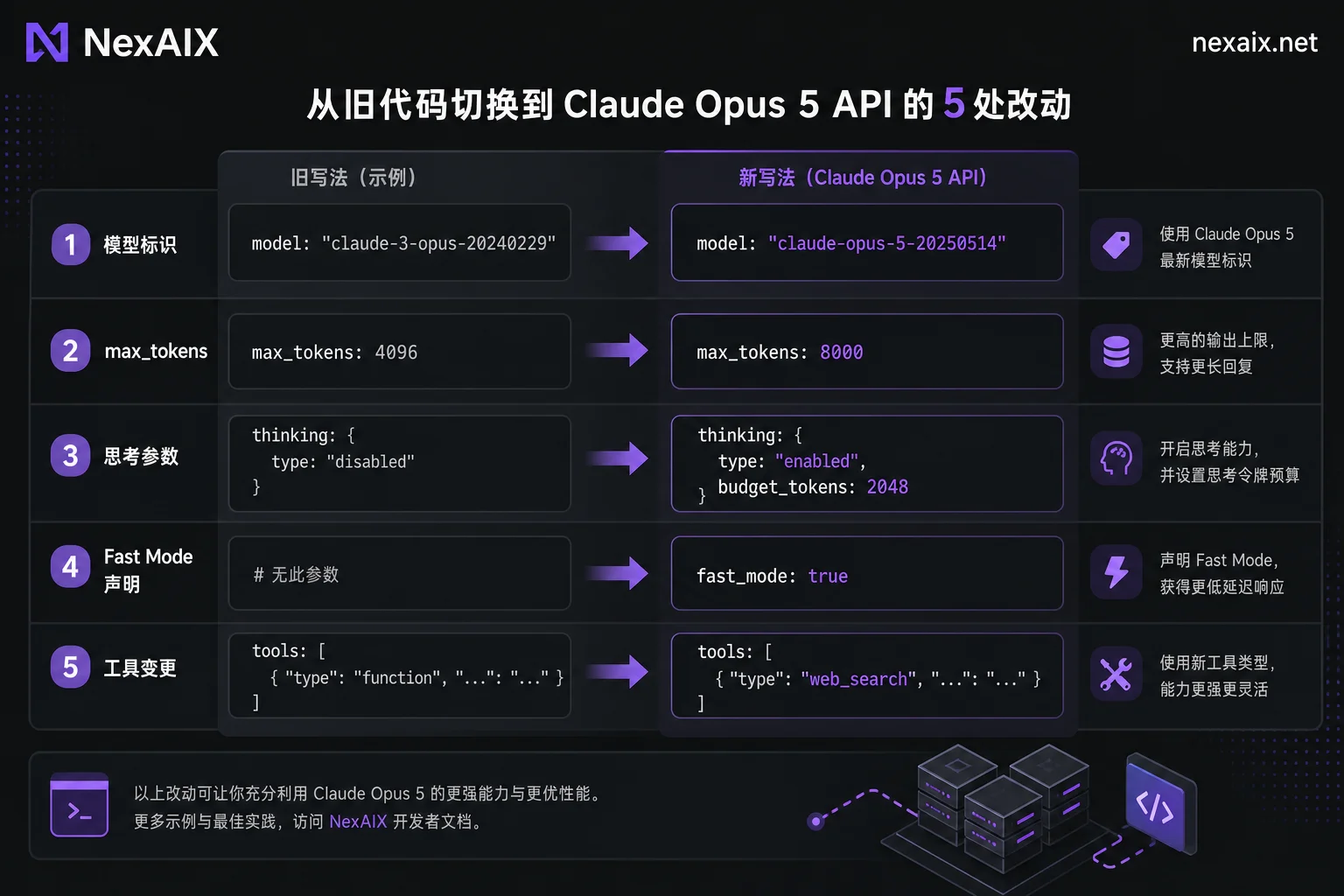
The Claude Opus 5 API supports up to 128,000 output tokens per request; exceeding this limit returns invalid_request_error. When migrating, you don't need to overhaul your existing Messages or OpenAI-compatible call chain. Simply review the request fields against the table below:
| Change Point | Old Usage (Common Default) | New Usage (Opus 5) | Symptom if Not Changed |
|---|---|---|---|
| Model Identifier | claude-3-5-sonnet | claude-opus-5 (or current official identifier) | Request 404 or hits old model |
| Output Limit | max_tokens: 8192 | max_tokens: 128000 (upper limit) | 400 error if exceeding 128K, long text truncated |
| Context Budget | Not explicitly allocated | Input + Output ≤ 1,000,000 tokens | Request limit exceeded, output squeezed out |
| Thinking Parameter | budget_tokens: 4096 | effort: medium (low/high/max) | 400 error, old parameter disabled |
| Tool Changes | Replace top-level tools array | tool_addition / tool_removal blocks inside system message | Prompt Cache prefix invalidated, inconsistency in history |
Among these, the model identifier, 128K limit, and thinking parameters are mandatory; not changing them will cause direct errors. The context budget and tool addition/removal are engineering optimizations but affect long-task stability. Specifications above are based on Anthropic's official documentation and current platform model page. If you encounter a 400 parameter validation error after switching, refer to Claude API 400 Troubleshooting for step-by-step checks.
Change 1: How to Declare Model Identifier and 128K Output Limit, What Happens if Exceeded
In the request body for Claude Opus 5 API, set the model field to the official identifier and max_tokens to 128000 at maximum. If you accidentally set 128001 or higher, the API will return an invalid_request_error parameter validation error rather than silently truncating. It's recommended to add a client-side pre-check to prevent 400 errors before sending.
A minimal copyable request snippet (authentication fields omitted):
{
  "model": "claude-opus-5",
  "max_tokens": 128000,
  "messages": [{"role": "user", "content": "写一篇长报告"}]
}
The key to "how to set Claude Opus 5 max output 128k" is explicitly setting max_tokens to 128000, not using the common 4K/8K defaults from older models.
Change 2: Allocating the 1M Context Budget: How Much Input Won't Crowd Out Output
Opus 5 has a context window limit of 1,000,000 tokens, but this is the total for input plus output, not a guarantee that filling input to 1M still ensures 128K output. For long-text tasks, reserve output budget based on worst-case scenario:
可用输入窗口 = 1,000,000 - max_tokens(计划输出上限)Truncation priority can follow: system prompt > tool definitions > recent conversation turns > historical summaries. Incorporate this formula into your context management module rather than hitting 400 later. For detailed billing and window breakdown, refer to Long-context API Selection and check the official pricing page.
Change 3: With Adaptive Thinking Enabled by Default, How to Pass Multi-turn History and Thinking Blocks
Opus 5 enables adaptive thinking by default, controlled via the effort parameter (low / medium / high / max). The old fixed budget_tokens parameter is disabled; passing it returns 400.
In multi-turn conversations and tool invocation chains, you must fully preserve and echo thinking blocks from historical turns in the request; otherwise, it breaks thinking continuity or even causes errors. Common bad practices include:
- Client keeps only text blocks and drops thinking blocks;
- Deleting thinking during history compression;
- Losing the thinking field during cross-gateway format conversion.
If you use the OpenAI SDK for multi-turn compatibility, refer to OpenAI SDK Multi-turn Thinking History for transmitting thinking history; the principle is similar.
Change 4: How to Enable Fast Mode and Which Workloads Benefit
Turning on Fast Mode is as simple as adding the speed: "fast" parameter and the corresponding fast-mode beta header. Output generation speed increases approximately 2.5x, with identical model weights and inference quality—no distillation or silent downgrade. For the exact mechanism, see the Fast Mode Documentation in Claude Platform Docs.
Scenarios suitable for Fast Mode: latency-sensitive interactive agent loops, short tool call rounds. Not suitable: batch processing and ultra-long offline generation where first-token latency isn't critical; the perceptual benefit of speedup is limited. Whether Fast Mode affects billing depends on the official pricing page and service provider model page.
Change 5: Changing the State Machine for Mid-Session Tool Addition/Removal
Changing tools mid-session doesn't error out, but directly replacing the top-level tools array invalidates all previous Prompt Cache and can easily corrupt context history. The correct approach is to use Mid-conversation tool changes: rely on the mid-conversation-tool-changes-2026-07-01 header, insert a message with role: 'system' in the messages array, with content blocks of tool_addition or tool_removal, rather than rewriting the global tools array. This allows adding/removing tools while maintaining cache hit.
Note: This capability is beta in the Messages API. Protocol details can be found in Mid-conversation System Messages Documentation. Some third-party gateways may not yet support it; check your service provider's documentation to confirm protocol mapping. For overall tool invocation API design, refer to Tool Invocation API.
Minimal Skeleton for Long-running Agents: How to Write Phased Tool Set Convergence
Combining the five changes above, a long-running agent can be organized as: declare only planning tools initially, inject domain tools using tool_addition when entering execution, remove them with tool_removal at phase end, while preserving thinking blocks and cache prefixes.
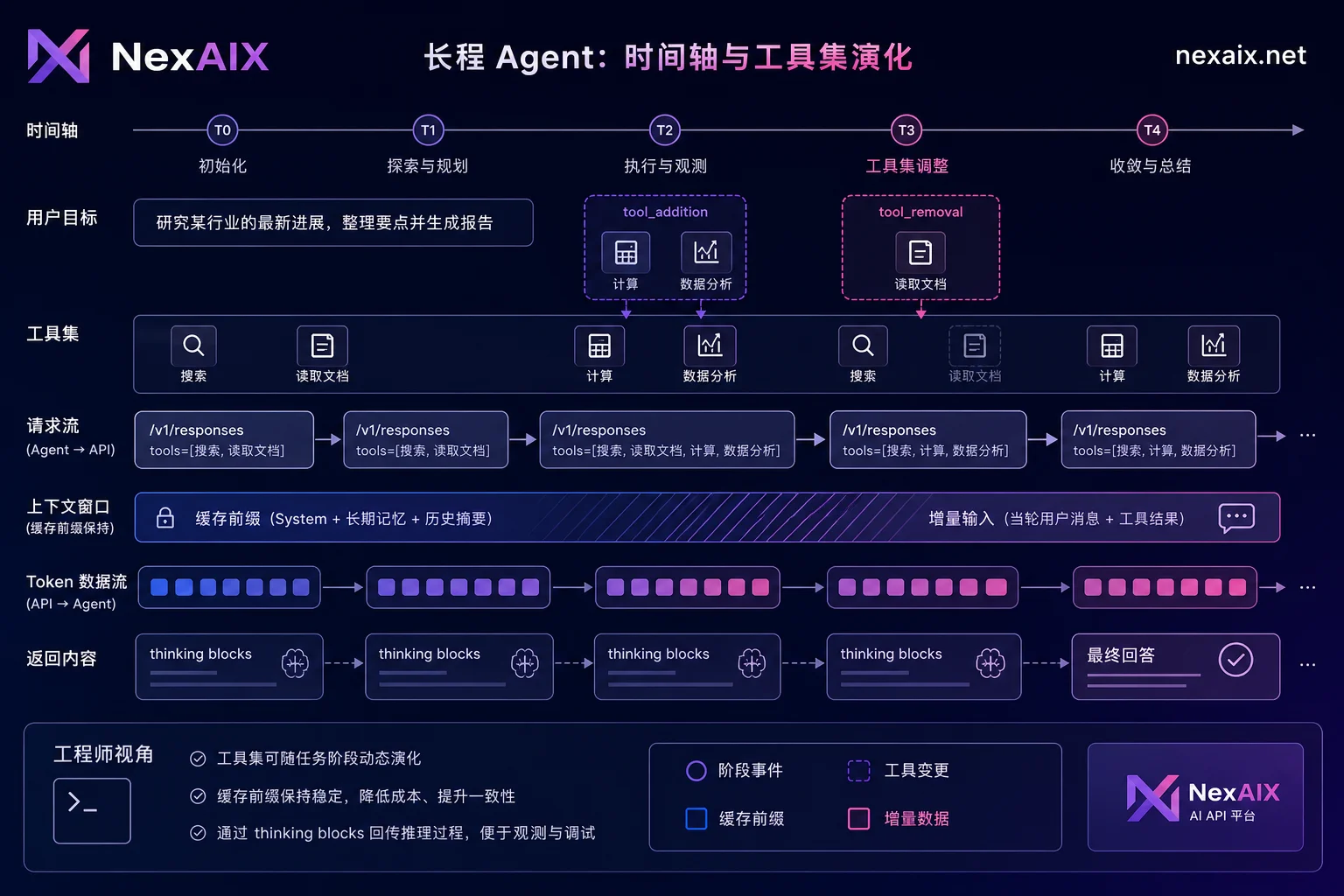
Switching effort and Fast Mode by phase balances quality and latency. Track the "currently active tool set" in the state machine to restore context on disconnection.
Officially Confirmed vs. Must Self-test: First Token Under High Concurrency with Long Context Needs Your Own Pressure Test
1M context, 128K output, effort parameter, Fast Mode speedup, and tool add/remove syntax are confirmed specifications from official or authoritative sources. However, claims like "zero latency degradation for TTFT under 1M context and high concurrency" are rumors; no unified SLA has been published officially.
Self-test method: Set input length tiers (e.g., 100K, 500K, 1M) and concurrency tiers (e.g., 1, 5, 10), record TTFT and total completion time for each, repeat multiple runs, and take P50/P95 percentiles.
Post-Change Must-Test: Regression Checklist
The following checklist covers six common issue points after integrating the Claude Opus 5 API.
- [ ] Streaming output and thinking block order normal
- [ ] Complete multi-turn tool invocation history
- [ ] Truncation and stop_reason near 128K output
- [ ] Behavior near 1M context limit
- [ ] Timeout and 429 backoff strategy
- [ ] Error code attribution (400/404/429)
This checklist is only meaningful if run on both old and new models. For regression comparison, use the same OpenAI-compatible code and only change the model field. On NexAIX, you can run comparative tests with base_url https://api.nexaix.net/v1,支持流式输出与函数/工具调用。NexAIX. It returns standard 429 with retry suggestions when models are saturated, doesn't silently switch to cheaper models, and the model field in the response indicates the actual model used, helping attribute failures to parameters, gateway, or capacity. Specific specs and pricing are subject to NexAIX model page and changelog.
FAQ
Can adaptive thinking be disabled?
No, it cannot be fully disabled. Only intensity can be adjusted via the effort parameter (low/medium/high/max). The old budget_tokens parameter is defunct and returns 400. This limitation also applies to thinking parameter configuration after integrating the Claude Opus 5 API.
What is the maximum context window for Opus 5?
Native support is 1,000,000 tokens. Note this is the total for input plus output; plan requests with output budget in mind.
How to set Claude Opus 5 max output to 128k?
Set max_tokens to 128000 in the request body; exceeding this triggers invalid_request_error.
Does Fast Mode reduce quality?
No. Fast Mode uses the exact same Opus weights, just accelerated inference infrastructure, with output token generation speed increased approximately 2.5x.
Will modifying the tools list mid-session cause errors?
It won't error directly, but changing the global tools array invalidates Prompt Cache. Use tool_addition / tool_removal system messages to change tools, keeping history and cache consistent.
How to choose between Claude Opus 5 and Sonnet 5?
Decide based on task reasoning intensity, latency, and cost: complex planning and long-text reasoning go with Opus 5; high-frequency, low-latency, cost-sensitive scenarios go with Sonnet 5. Specific values are subject to official documentation.




Comments(0)