 NexAIX-官方博客
Conclusion First: Where to Change base_url and Whether to Include /v1
Change OpenAI base_url at the client constructor: Python uses base_url, Node uses baseURL, and curl directly uses the full request URL; custom endpoints must include /v1 themselves, and explicit code parameters take priority over the OPENAI_BASE_URL environment variable. As of late July 2026, Fireworks' Nexus routing and the open-source FireConnect compatibility layer support switching between OpenAI and Anthropic protocols, indicating that "changing the prefix" does not equal "changing the protocol." This article is based on the official repository documentation from August 2026; readers should verify against their installed version.
What Exactly Does Changing OpenAI base_url Do: The Final Request URL Assembled by the SDK
Many people think base_url is the "entire address," but it's just a prefix string. When the official SDK calls Chat Completions, it always sends a POST request to {base_url}/chat/completions. In other words, once you pass a custom base_url, the SDK will not append the version number for you; it will concatenate your string as-is with the fixed path.
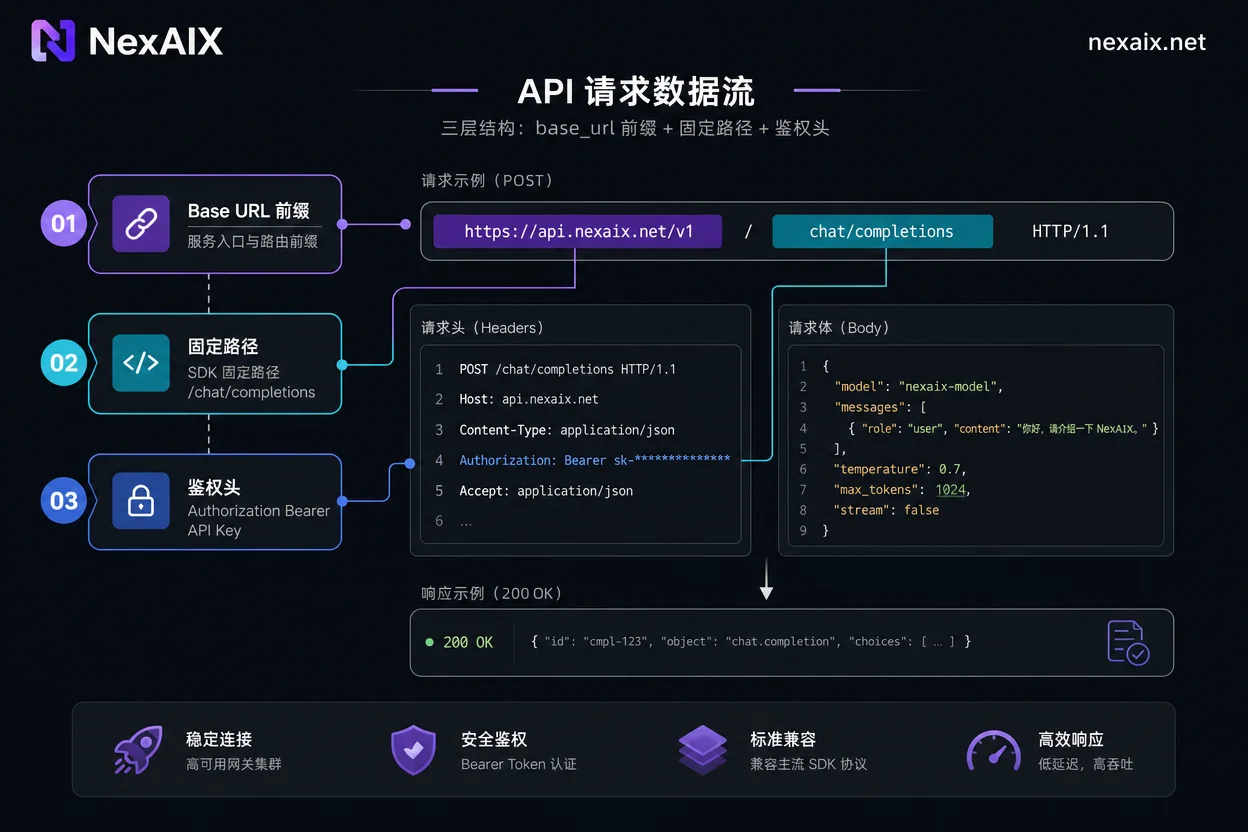
Python: Explicit Parameter, OPENAI_BASE_URL Environment Variable, and Priority
In Python, there are two ways to configure the endpoint:
from openai import OpenAI
client = OpenAI(base_url="https://api.nexaix.net/v1", api_key="你的key")
Or inject via the environment variable OPENAI_BASE_URL. The official documentation states that explicitly passed parameters in the constructor take priority over environment variables, so once you write base_url in code, the environment variable becomes ineffective; when troubleshooting, first confirm whether the value in code and CI match.
Node/TypeScript and curl: baseURL Field and Equivalent Handwritten Request Headers
The Node SDK uses camelCase baseURL, which differs from Python's base_url only by case, a common source of typos during migration:
import OpenAI from "openai";
const client = new OpenAI({ baseURL: "https://api.nexaix.net/v1", apiKey: "sk-..." });
curl has no base_url concept; you manually write the final URL that the SDK would assemble, which serves as a baseline for troubleshooting:
curl https://api.nexaix.net/v1/chat/completions \
  -H "Content-Type: application/json" \
  -H "Authorization: Bearer YOUR_KEY" \
  -d '{"model": "gpt-4o-mini", "messages": [{"role": "user", "content": "Hello"}]}'
/v1 and Trailing Slash: Four Combinations and Which Leads to 404
Based on the official SDK's path concatenation logic, here are four typical base_url formats and their resulting final request paths:
| base_url format | Final request path | Result |
|---|---|---|
https://host | https://host/chat/completions | 404 (missing /v1) |
https://host/ | https://host/chat/completions | 404 (missing /v1) |
https://host/v1 | https://host/v1/chat/completions | Works |
https://host/v1/ | https://host/v1/chat/completions | Works (trailing slash folded) |
Trailing slashes are typically normalized by the SDK, so the risk is far lower than missing /v1. The official built-in path works only for the default official domain; once you set a custom base_url, you must include the version prefix yourself.
Four Tests to Run After Changing: Non-streaming, Streaming, Tool Calls, Timeout and Retry
After changing OpenAI base_url, perform regression testing in the following order:
- Non-streaming request: Use a minimal request to confirm path and auth pass, e.g., the curl example above.
- Streaming request: Pass
stream=trueand observe if you receive multiple data chunks instead of a complete body, to confirm the endpoint supports streaming. - Tool calls: Test the round trip of
toolsandtool_callsto ensure the target endpoint supports function calling. - Timeout and retry: Confirm timeout settings and retry behavior with the new endpoint, avoiding misjudgment due to short timeouts.
Error Comparison Table: 404 / 401 / 400 Parameter Not Recognized / Connection Refused - Which Layer They Originate From
The table below summarizes the most common four error types and their troubleshooting directions:
| Error Symptom | Layer | Fix and Verification |
|---|---|---|
| 404 Not Found | URL path prefix error, likely missing /v1 | Check if base_url ends with /v1; use curl to directly request and confirm |
| 401 Unauthorized | Auth failure, key mismatch or environment variable override | Confirm api_key matches the endpoint; check if environment variable overrides code parameter |
| 400 Parameter not recognized | Request body fields rejected, possibly non-standard | Remove non-standard fields or use parameter names supported by the endpoint |
| Connection refused / timeout | Network layer, TLS or firewall | Check network connectivity and TLS version; confirm endpoint reachable |
Please verify the returned body against the service provider's error code documentation. If you receive 429 instead of 404/401, it falls under quota/rate limit; refer to AI API 429 Error Troubleshooting. Also, check the developer docs and error code pages of the service provider to confirm the model field corresponds to the actual model executed; under full load, expect standard 429 rather than silent downgrade, which helps with endpoint comparison.
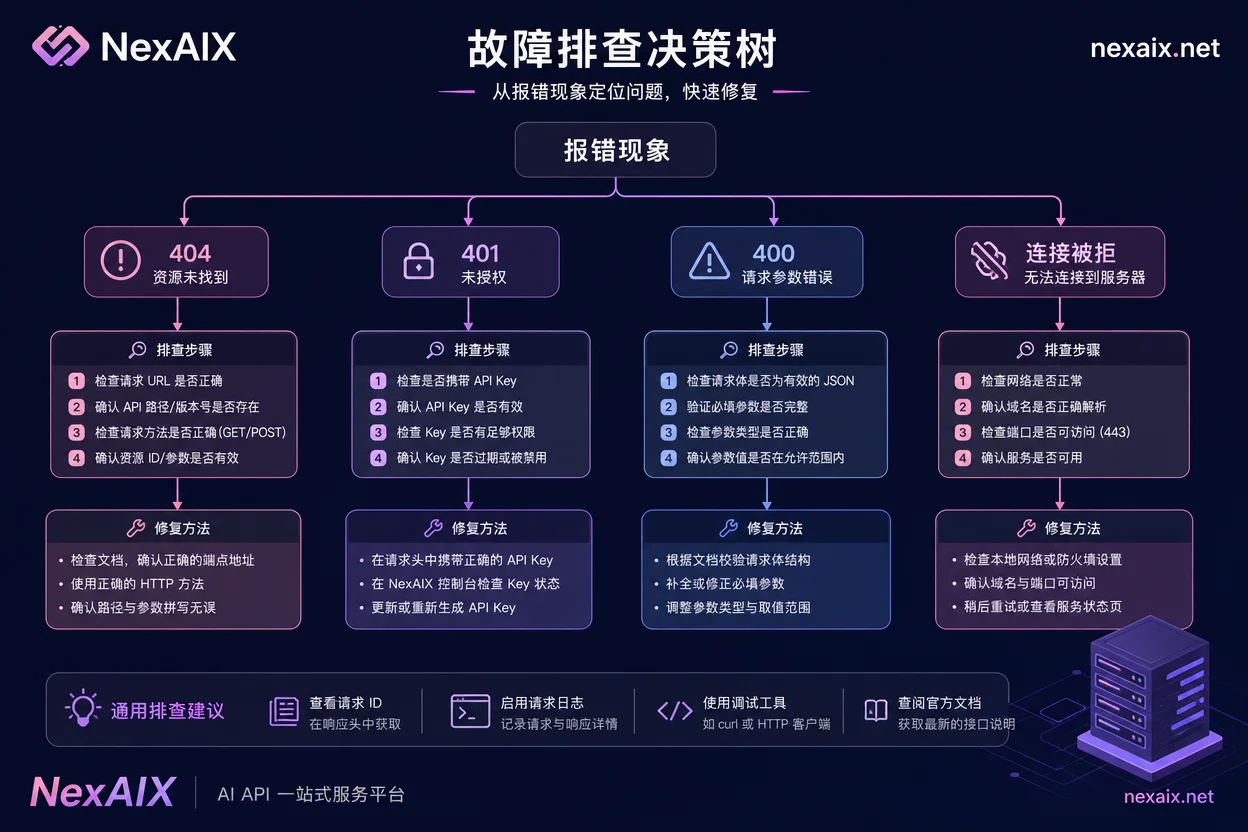
Parts That Cannot Be Migrated by Only Changing base_url: Non-standard Fields and Cross-Protocol
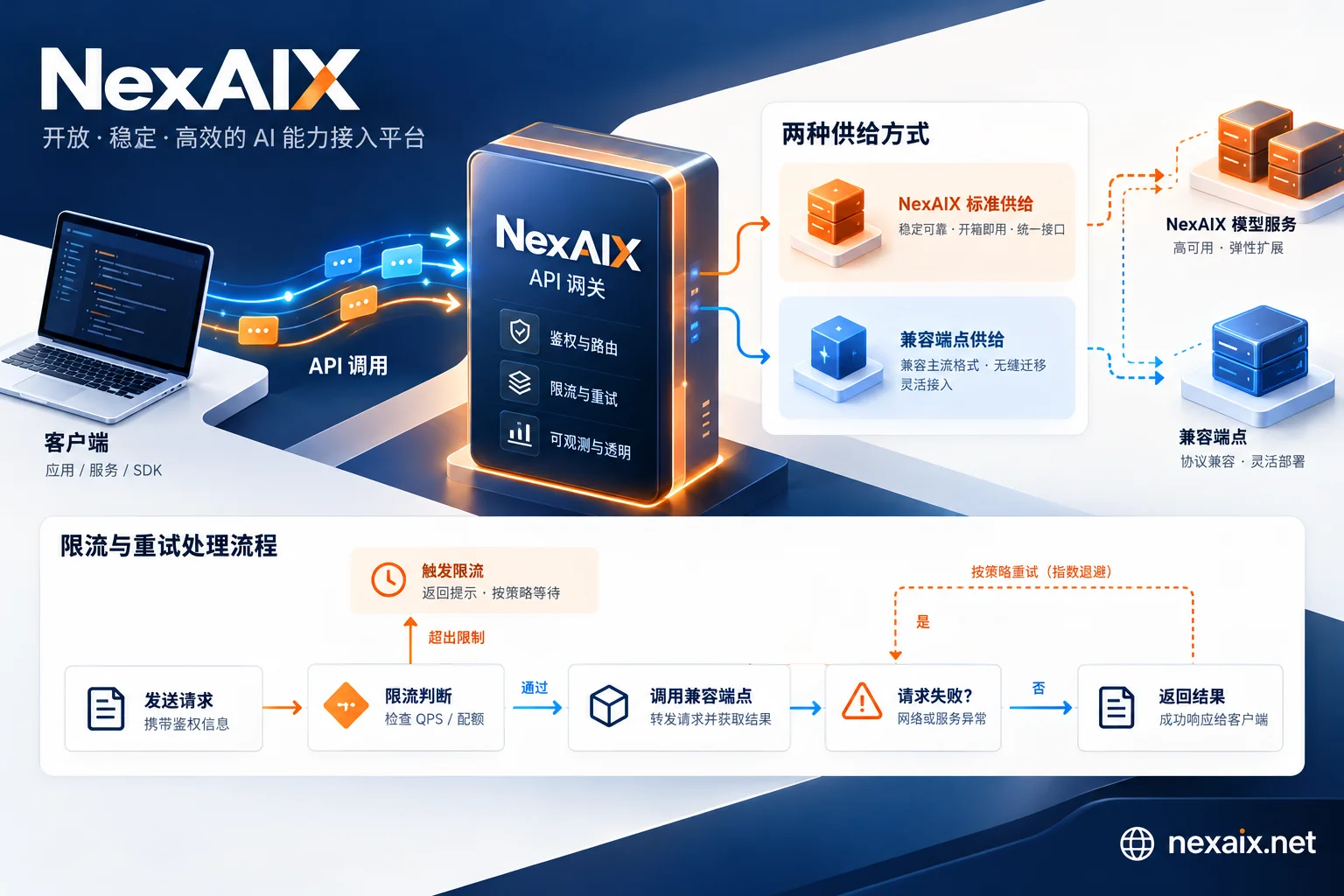
Changing base_url can migrate standard Chat Completions calls within the same protocol family, but different vendors may add non-standard fields that could be rejected or silently ignored on the target endpoint. Cross-protocol is even more so: the native structures of OpenAI and Anthropic differ greatly; simply changing base_url cannot seamlessly use Anthropic's native Messages API structures (such as native prompt caching or thinking blocks). Fireworks' Nexus and FireConnect support dual-protocol routing, illustrating that cross-protocol requires an adaptation layer.
Minimal Reproducible Script: One Code to Switch Between Multiple Endpoints for Comparison
To verify "the returned model is the requested model," you can write a small script that extracts base_url and api_key into a config array, polls multiple compatible endpoints, and outputs status code, time to first byte, and the model field from the response:
import time
from openai import OpenAI

endpoints = [
    ("https://api.nexaix.net/v1", "sk-..."),
    ("https://api.openai.com/v1", "sk-..."),
]
for base, key in endpoints:
    client = OpenAI(base_url=base, api_key=key)
    t0 = time.time()
    r = client.chat.completions.create(model="gpt-4o-mini", messages=[{"role":"user", "content":"hi"}])
    print(base, r.model, round(time.time()-t0, 2), r.choices[0].message.content)
NexAIX's https://api.nexaix.net/v1 follows the standard Chat Completions compatible path; you can use test credits to run a minimal request before switching to production. When switching endpoints, note SDK version differences; it's recommended to verify against your installed version. Related experience can be found in Unified AI API Integration with LangChain Overriding base_url and OpenAI-compatible API model migration path.
FAQ
When using Python to set OpenAI base_url, which takes effect: environment variable or code parameter?
The explicitly passed base_url parameter in code takes priority over the OPENAI_BASE_URL environment variable. That is, if you write base_url in the constructor, the environment variable will not take effect. When troubleshooting, confirm whether base_url is hardcoded in code.
After changing base_url, I get a 404. What is usually the cause?
In most cases, the /v1 path prefix is missing. For example, if base_url is written as https://example.com, the actual request will go to https://example.com/chat/completions, causing the gateway to return 404. First check whether your base_url ends with /v1, then use curl to directly request and confirm.
Should base_url end with a trailing slash?
A trailing slash (e.g., /v1/) is usually normalized by the SDK and won't cause errors, but it's recommended to omit it for cleanliness. The critical point is that it must include the /v1 version prefix; missing it will cause 404.
Where is the baseURL parameter in the Node openai library?
When instantiating the OpenAI client, pass a configuration object: new OpenAI({ baseURL: 'https://api.example.com/v1', apiKey: '...' }). Note the camelCase baseURL, not the Python-style base_url.
After changing base_url, streaming output has no response. How to troubleshoot?
First, go back to curl with a non-streaming request to test, confirming the path and auth are fine. If non-streaming works, check whether the request body includes stream=true, and also confirm the target endpoint supports streaming. Some compatible endpoints have incomplete streaming support, which may result in no output.


Comments(0)